
The Japanese keyword hack quietly turns your WordPress site into a storefront for someone else’s counterfeit goods. Your own pages look normal, while Google quietly indexes thousands of pages of Japanese spam under your domain, your rankings slide, and Search Console gets ready to email you the words “Hacked content detected.” This guide walks you through finding it, removing it, and the part most guides skip: getting the spam out of Google’s index so your rankings come back.
It is a well-documented attack. Google publishes its own removal guide, and the WordPress support forums are full of owners describing the exact same symptoms. The steps below follow Google’s official process and add the WordPress-specific detail that Google leaves out.
TL;DR
| What it is | Attackers inject thousands of auto-generated Japanese spam pages into your site and cloak them, so search engines see the spam while you see your normal site. |
| First sign | Japanese titles under your domain in Google, a Search Console “Hacked content” alert, or a site:yourdomain.com search showing pages you never made. |
| Why it hides | Cloaking. The spam pages serve Japanese content to Googlebot and a 404 to you, so they stay invisible until your rankings drop. |
| How to remove it | Back up, remove rogue Search Console owners, clean the injected files and database, reinstall core, then close the entry point. |
| The part people miss | Cleaning files does not clear Google. You still have to make the spam URLs return 404/410 and let Google recrawl. This takes weeks. |
| Can’t do it yourself? | We clean infected sites for $89 flat, including the Search Console recovery. |
What the Japanese keyword hack actually is
The Japanese keyword hack, sometimes called Japanese SEO spam, is an automated attack that breaks into a site through a known vulnerability, then plants huge numbers of spam pages in randomly named directories. The pages fill up with Japanese text and affiliate links to stores selling counterfeit brand goods, mostly fake watches and bags. The attacker earns money every time one of those pages ranks and someone clicks through.
The pages sit at URLs you never created, in folders with names like /ltjmnjp/ or /tmp7g/. Here is what one of them looks like when it is served to a search engine.
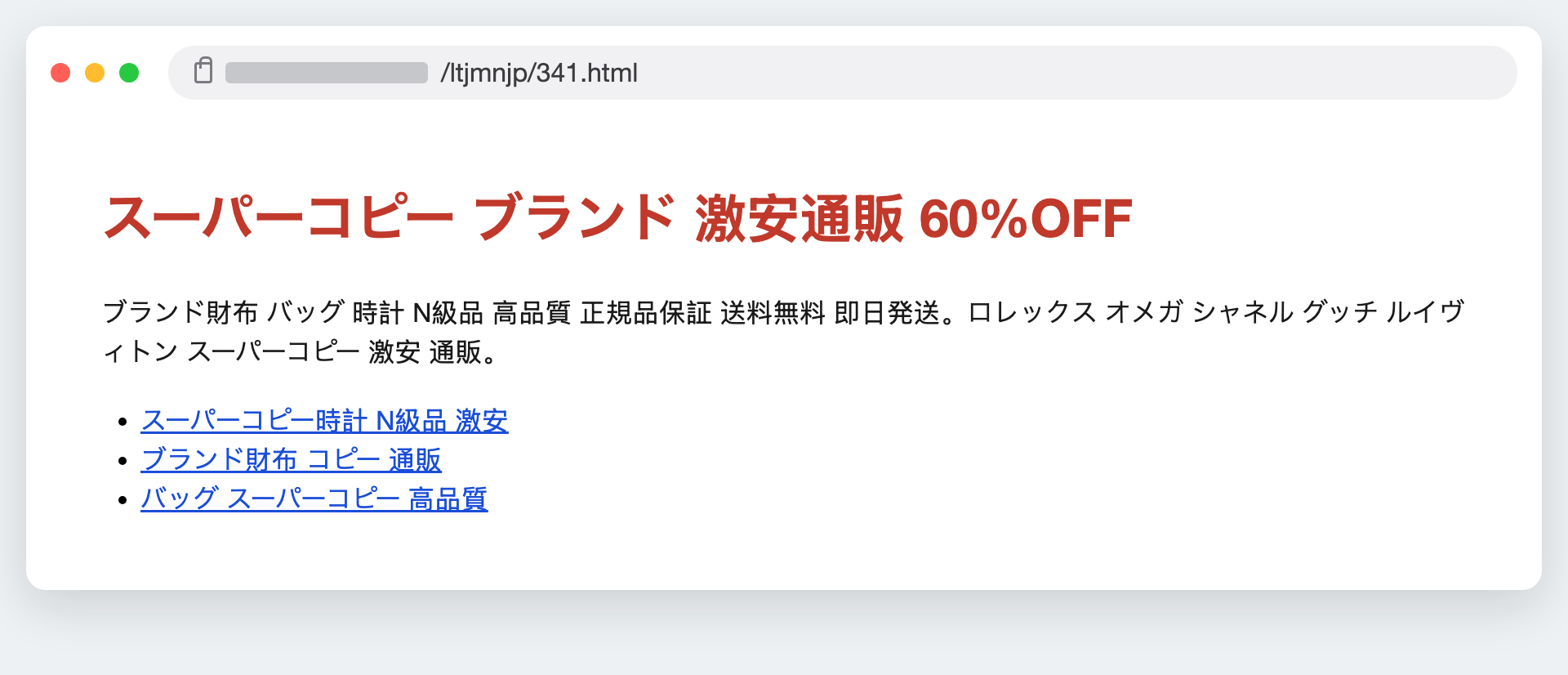
The scale is what shocks people. This is not five or ten pages. Owners routinely report tens of thousands. One person on the WordPress.org support forum described the problem growing in front of them:
Later, 98k+ fake Japanese/English URLs got indexed, none of which exist on my site. I blocked these URLs using robots.txt and listed them in a spam.txt (404 pages). This deindexed around 15-20k links, but new fake URLs keep appearing and growing daily (78k+ now). How can I stop this permanently?
bilalfromfocusteck, WordPress.org support forum
That post also contains the single most common mistake in the whole recovery, which we will come back to: blocking the spam URLs in robots.txt. It feels right and it makes the problem worse.
Why you cannot see it: cloaking
What makes this hack so disorienting is that everything looks fine from where you sit. You browse your site, every page is normal, a security plugin scan may even come back clean. That is by design. The spam pages use cloaking: they check who is asking for the page, and answer differently depending on the answer.
Ask for one of the spam URLs in your browser and you get a 404, so you assume it does not exist. Googlebot asks for the exact same URL and gets a full page of Japanese sales copy. Same address, two different answers. You can prove it to yourself with two curl commands that change only the user-agent.
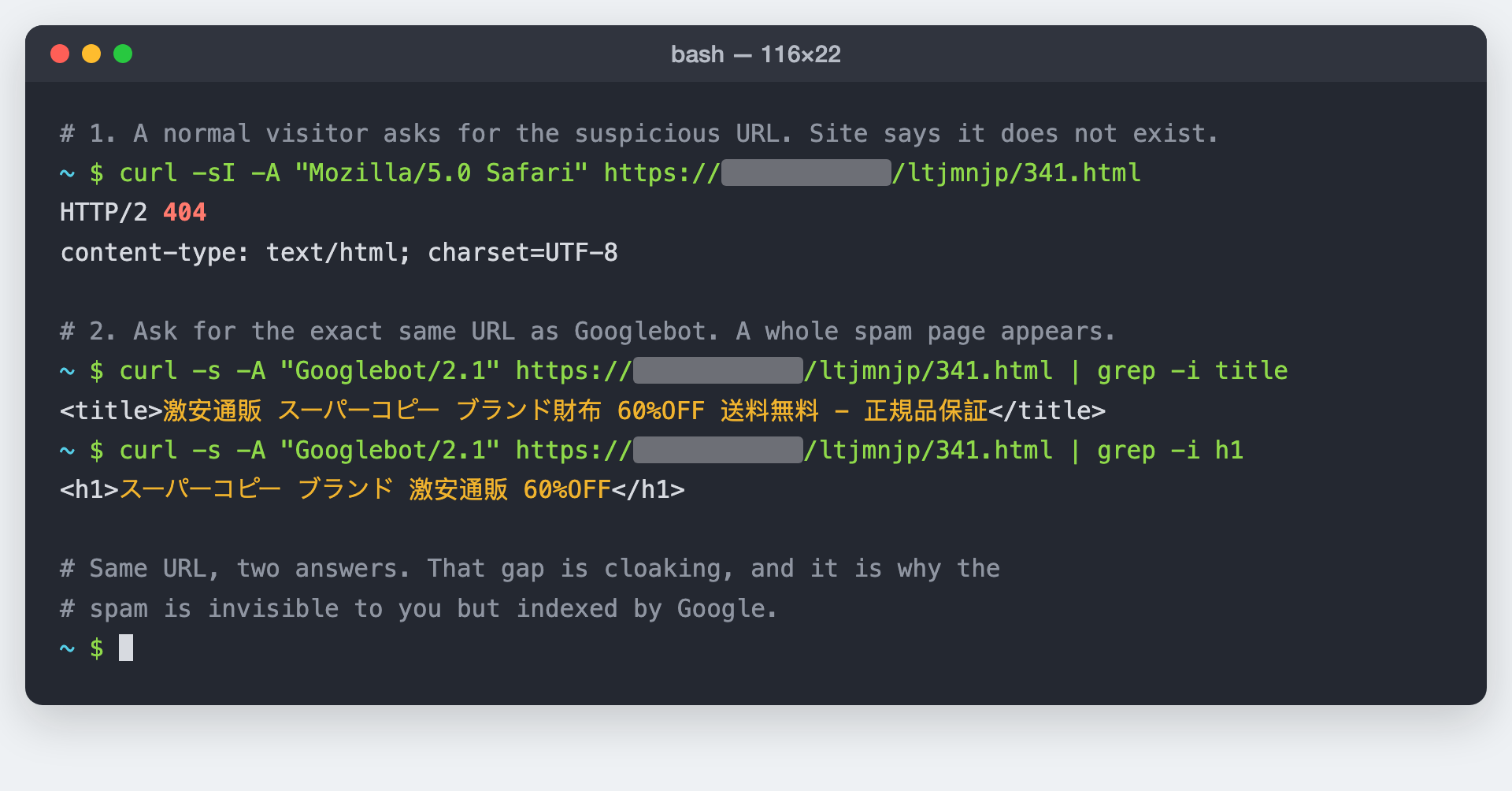
This is also why Google’s own advice is to check with the URL Inspection tool in Search Console rather than trusting your browser. The tool fetches the page as Google does, so it reveals the cloaked content that a normal visit hides.
How to confirm you have it
Before you tear the site apart, confirm the diagnosis. Four checks, quickest first.
- Search your own site in Google. Type
site:yourdomain.cominto Google. If you see rows of Japanese titles and descriptions, or thousands more results than you have pages, that is the hack. Add a word likesite:yourdomain.com 財布(the Japanese for “wallet”) to surface the spam directly. - Open Search Console. Look at Security Issues for a “Hacked content” report, and check Pages (indexing) for a sudden spike of indexed URLs. A ten-page site showing 80,000 indexed pages is not a glitch.
- Check who owns your Search Console property. Attackers often add themselves as a verified owner so they can control your sitemaps and geotargeting. Under Settings then Users and permissions, remove anyone you do not recognise.
- Inspect a spam URL. Take one of the strange URLs from the
site:search and run it through the URL Inspection tool. If it shows Japanese content while your browser shows a 404, cloaking is confirmed.
A clean plugin scan does not mean a clean site.
Owners on the forums repeatedly report a scan coming back clear while Google still shows tens of thousands of spam pages. The injected files are often hidden in the uploads folder or disguised as cache files, and cloaking keeps them off the front end. Trust the site: search and Search Console over a green tick from a scanner.
That gap between “scan says clean” and “Google says hacked” is exactly what one owner ran into:
I ran a scan on my site which showed the site was clear of being hacked. I then contacted my hosting company who ran their own checks and confirmed that my site had not been hacked or injected with malicious code.
Gopal Ji, on a 10-page site showing 80,000 indexed pages, Google Search Central community
Removing the hack, step by step
This is the order Google recommends, with the WordPress specifics filled in. Work through it top to bottom. If the site earns money and every hour down costs sales, restore a known-clean backup first and do the forensic version on a staging copy.
Back up the hacked site before you touch anything
Yes, even hacked. You want a copy of the injected files and the altered database, both as evidence and as a safety net in case a cleanup step goes wrong. Download the files and export the database, then label the archive clearly so it never gets restored by accident.
Remove any Search Console owners you do not recognise
Do this early. As long as the attacker is a verified owner, they can keep resubmitting spam sitemaps and undo your work. Remove the rogue owner in Search Console, then check your site’s root and DNS for the verification token they used (an HTML file, a meta tag, or a DNS TXT record) and delete it so they cannot re-verify.
Find the injected files
The spam engine is a set of PHP files that do not belong. They cluster by date, because the whole site is infected in one automated burst, and they hide in places WordPress never writes PHP, especially
wp-content/uploads. List your PHP files newest first and look for a cluster with the same timestamp.Recognise the payload
Injected files are obfuscated so they do not read as spam at a glance. Google names the patterns to grep for:
base64_decode,eval,gzinflate,str_rot13andstrrev. A file in your uploads folder containing any of these is almost never legitimate.Clean the files and the database
Remove the injected files, reinstall WordPress core and every plugin and theme from official sources rather than trying to surgically edit each infected file, and check your
.htaccessfor rewrite rules the attacker added. Then check the database: thewp_options,wp_usersandwp_poststables are common hiding places for injected content and rogue admin accounts.Replace the sitemap and close the entry point
Delete the spam sitemap the attacker submitted and regenerate a clean one. Then find how they got in: an out-of-date plugin, a weak password, or shared-hosting cross-contamination. Update everything, force a password reset for every user, and turn on two-factor authentication. Skip this and you are likely to be back here within a day.
On a site with SSH access, steps three and four are quick: list the recently changed PHP files, grep the uploads folder for the tell-tale functions, and the payload shows itself in seconds.
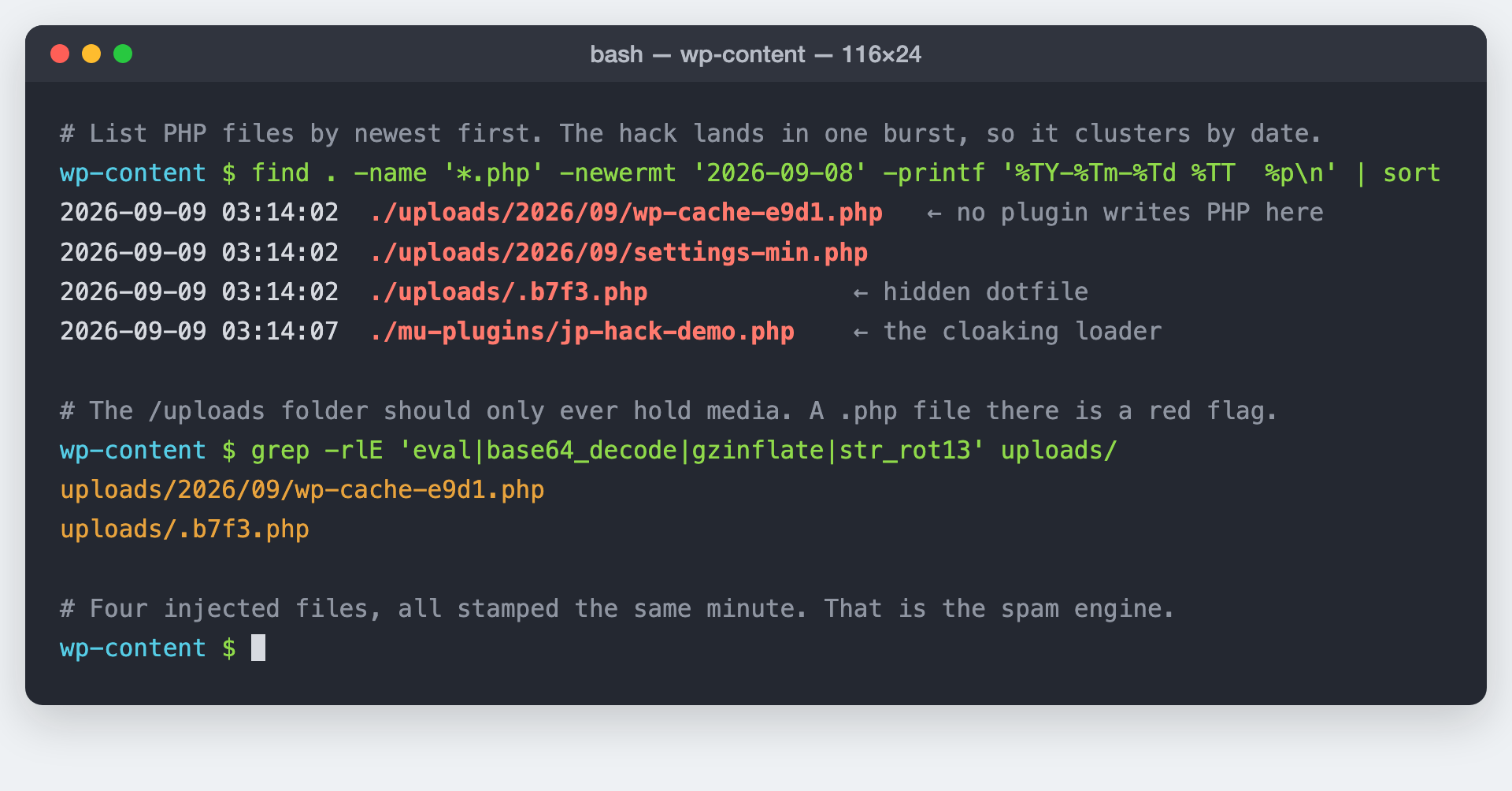
uploads, where no plugin writes PHP. Demo site; paths shortened.One warning about automated removal, from the developer of a well-known WordPress security plugin:
Be wary of any plugin that claims it can automatically remove snippets of malware from a file without changing the rest of the file.
Paul Goodchild, creator of Shield Security, getshieldsecurity.com
Reinstalling clean core and plugin files is safer than trusting a tool to snip malware line by line, because a missed backdoor means the whole thing grows back. This is the same reason proper site hardening is a different job from installing a scanner.
The part everyone skips: getting the spam out of Google
Here is the hard truth that turns a one-day cleanup into a one-month recovery. Cleaning your files removes the spam from your server. It does nothing to the tens of thousands of spam URLs already sitting in Google’s index. Those keep showing in search results, keep dragging your rankings, and clear only when Google recrawls each one and finds it gone. You cannot rush Google, but you can stop fighting it.
The forums are full of people stuck at exactly this stage, months after the files were clean:
My main worry is that cached Japanese content still appears in SERP more than 6 months after I did the cleanup. When I do site:mysite the whole SERP is Japanese content and most of my main site URLs are not appearing. This has affected all my SEO efforts.
Devices Technology Store, Google Search Central community
That is six months lost to a fixable mistake. Get this stage right and the recovery runs in weeks instead. Three rules decide how fast it goes.
Let the spam URLs return 404 or 410, and let Google see it
Once the files are gone, the spam URLs should return a 404 (Not Found) or, better, a 410 (Gone). Google treats both as a signal to drop the page, and 410 says “this is never coming back,” which is exactly true of URLs you never created. The catch is that Googlebot has to actually fetch each URL to see the 404. That is where the next rule comes in.
Do not block the spam paths in robots.txt
This is the mistake in that first forum quote, and it is the most common one people make. Blocking /ltjmnjp/ in robots.txt feels like slamming the door. What it actually does is stop Googlebot from ever crawling those URLs again, which means Google never sees the 404, which means the pages stay in the index indefinitely. To remove a page, you have to let Google crawl it and find it gone. Blocking the crawl freezes the spam in search results.
Use the Removals tool for triage, not as the fix
Search Console’s Removals tool is useful for hiding the worst spam URLs fast, but read what Google says about it plainly: a request “lasts only about six months” and it hides URLs rather than deleting them. It buys you breathing room while the real fix, the 404s plus recrawling, does the permanent work. Lean on it alone and the spam reappears half a year later.
With those three straight, the recovery sequence in Search Console is short: request a review under Security Issues, submit your clean sitemap so Google has a fresh map to crawl, and use URL Inspection on a sample of spam URLs to confirm they now read as 404. Then wait. Google works through the backlog over the following weeks, the spam falls out of the index, and your real pages climb back.
Why it matters more than a normal hack: the numbers
A defaced homepage is obvious and gets fixed in an hour. The Japanese keyword hack is quiet, which is what makes it expensive. It runs for weeks before most owners notice, and by then Google has learned to associate your domain with spam.
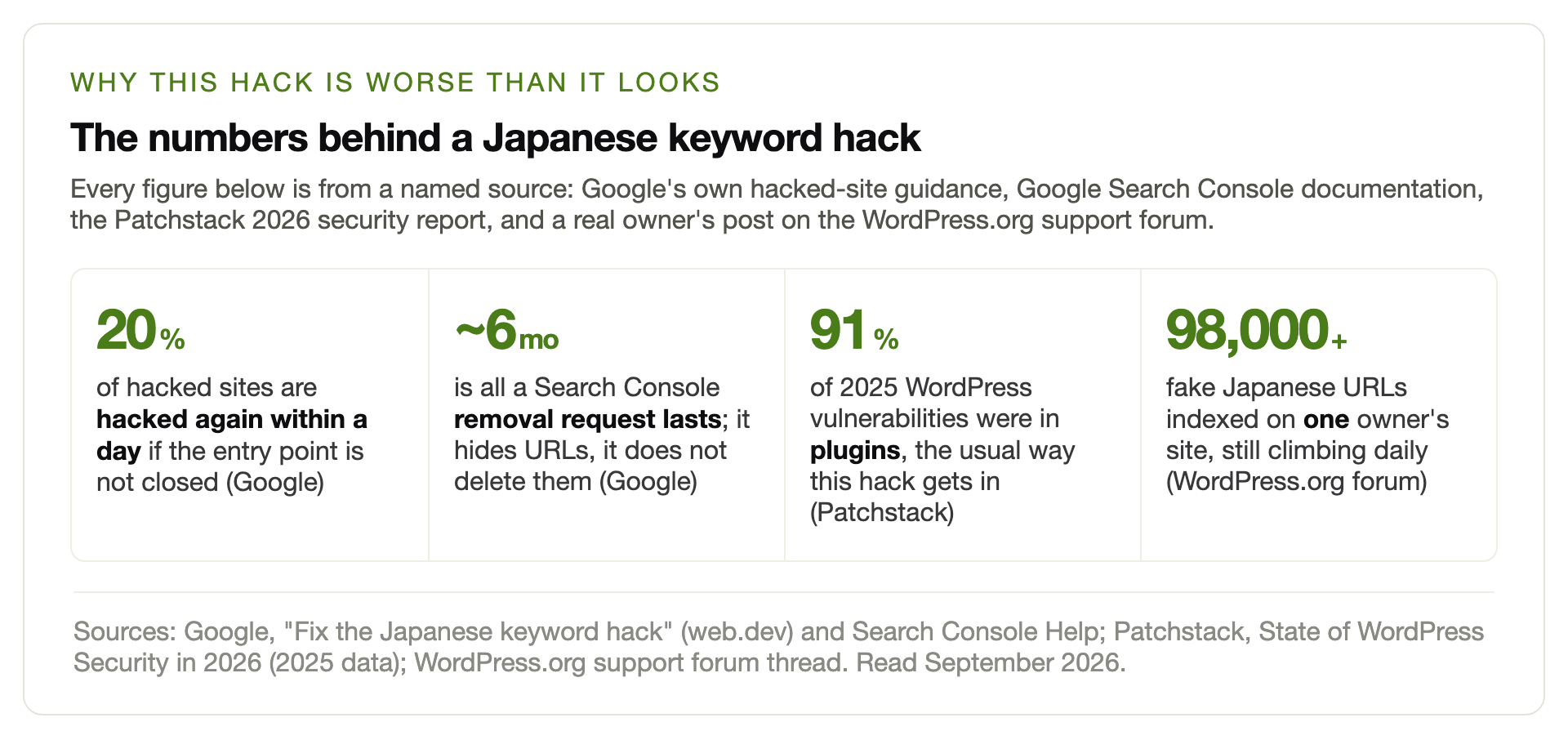
The reinfection figure is the one to take to heart. Google reports that 20% of hacked sites are hacked again within a day when the entry point is left open. Cleaning without closing the door only pauses the attack; the bots come straight back. And since 91% of last year’s WordPress vulnerabilities were in plugins, per the Patchstack 2026 report, the door is almost always an out-of-date plugin. Keeping plugins updated and tested is ordinary WordPress maintenance, and it is what stops the whole cycle before it starts.
Recovering your rankings is a separate job.
Removing the spam stops the bleeding. Winning back the positions you lost, especially if the hack ran for months, is search work in its own right. One forum user was still chasing lost rankings two months after a clean cleanup. If the traffic does not return on its own once the index clears, that is where recovering search visibility becomes the next task.
When to bring in help
You can do all of this yourself if you are comfortable with SSH, a database, and a slow back-and-forth with Search Console. Plenty of owners do. Bring in someone when any of these is true: the site earns money and every day of Japanese SERPs is lost trade, the reinfection keeps coming back because the entry point is buried, or the forensic side (finding every backdoor, not just the obvious files) is past what you want to gamble on. A missed backdoor means the whole thing regrows, and you start over.
Seeing Japanese pages under your domain?
We clean the injected files, close the entry point, and handle the Search Console recovery so the spam actually leaves Google. Malware cleanup is $89 flat, one-time, and if we cannot fix it there is no charge.
Get the hack removedStart with a free auditFrequently asked questions
What is the Japanese keyword hack?
It is an automated attack that breaks into a website through a vulnerability and creates thousands of spam pages filled with Japanese text and affiliate links to counterfeit goods. The pages are cloaked, so they show to search engines but not to you, which is why the first sign is usually Japanese titles appearing in Google results rather than anything visible on your own site.
Why do I see Japanese pages in Google but not on my own site?
Because of cloaking. The hacked pages check the user-agent of whoever requests them. Search engine crawlers get the full Japanese spam page, while a normal browser gets a 404 or your ordinary content. To see what Google sees, use the URL Inspection tool in Search Console rather than visiting the URL in your browser.
My security plugin says the site is clean. Can I still be hacked?
Yes, and it is common with this hack. Injected files are often hidden in the uploads folder or disguised as cache files, and cloaking keeps the spam off your front end, so a surface scan can miss it. If a site:yourdomain.com search shows Japanese pages or Search Console reports hacked content, believe those over a clean scan and look deeper.
How do I remove the spam pages from Google search results?
Clean the site so the spam URLs return a 404 or 410, do not block those paths in robots.txt, then let Google recrawl them. Submit a clean sitemap and request a review in Search Console. The Removals tool can hide the worst URLs temporarily, but it lasts only about six months and does not delete anything, so the lasting fix is the 404 plus recrawling.
Why should I not block the spam URLs in robots.txt?
Blocking them stops Googlebot from crawling them, which means Google never sees that they now return a 404 and never removes them from the index. The pages stay in search results indefinitely. To get a URL removed you have to let Google crawl it and find it gone, so the spam paths must stay crawlable until they have dropped out.
How long does it take to recover after cleaning the hack?
Removing the files is quick. Clearing Google’s index takes weeks, because Google has to recrawl every spam URL to confirm it is gone, and there can be tens of thousands. Owners who get the steps right usually see the spam fall away over a few weeks. Owners who block the URLs in robots.txt or rely only on the Removals tool can still be stuck months later.
Will the hack come back after I clean it?
It will if you do not close the way in. Google reports that 20% of hacked sites are compromised again within a day when the vulnerability is left open. Since most WordPress break-ins come through an out-of-date plugin, the reinfection fix is to update everything, reset all passwords, enable two-factor authentication, and keep the site maintained so the hole does not reopen.
Will this hack hurt my SEO and rankings?
It already is. While the spam is indexed, Google associates your domain with counterfeit-goods content, your real pages get pushed down, and a “Hacked content” label can appear next to your listing. Most sites recover their rankings once the index clears and the entry point is closed, but if the hack ran for a long time, winning back lost positions can take dedicated search work on top of the cleanup.
How did my WordPress site get infected in the first place?
Almost always through a known vulnerability in an out-of-date plugin or theme, a weak or reused password, or cross-contamination from another infected site on the same shared hosting. The attack is automated: bots scan the web for sites running vulnerable versions and inject the spam without a human ever choosing your site specifically.
