Two months of trying. Sitemaps checked, robots.txt checked, DNS and SSL checked, and a paid expert hired who could not fix it either.
Somebody posted this on r/SEO last week, and the frustration in it is the normal experience of this status:
I’ve re-indexed the website many times during the last two months, but it won’t index. I even hired an fiverr-“expert” for this case, but he cannot help me.
u/himmelsblau30, r/SEO, October 2026
Here is why that effort went nowhere. “Crawled – currently not indexed” is the one status in Search Console with nothing on the page to find.
Every other reason leaves a mark you can read off the response. This one is a decision, and decisions do not show up in your HTML.
The short version
| Google says do not resubmit | In its own documentation: “no need to resubmit this URL for crawling.” Eight of the twelve guides we read tell you to resubmit anyway. |
| Six causes leave a trace | We built seven pages, one per reason Google skips a page. A script found the signal on every one except the quality call. |
| Crawled is not Discovered | Different problem, different fix. One migration we found had 10,517 URLs in one status and 209 in the other. |
| Our own logs, seven days | Verified Googlebot made 755 requests to this site. 74.8% of them returned 404. Only 19 distinct live pages got a visit. |
| Half our posts got nothing | Googlebot came to three of our six published articles four, four and one times. It never visited the other three. |
| AI crawlers now dominate | Over the same week, AI and answer-engine bots made 1,811 requests. That is 240% of Googlebot’s volume. |
| Crawl budget is not your problem | Google’s own threshold starts at a million URLs. If you run a WordPress site, rule it out and move on. |
What the status actually says
Google’s Page Indexing report documentation runs to two lines. Everyone skips the second one.
// Google's Page Indexing report, in full

Crawled - currently not indexed
  The page was crawled by Google but not indexed.
  It may or may not be indexed in the future;
  no need to resubmit this URL for crawling.

Discovered - currently not indexed
  The page was found by Google, but not crawled yet.
Read that last line again. Google is telling you, in the report itself, that the button everyone reaches for will not help.
Of twelve current guides we read, eight tell you to click Request Indexing anyway. Three quote the line that says not to.
Resubmitting does sometimes appear to work, which keeps the habit alive. Somebody running a site with three million clicks a quarter described the pattern exactly:
if I use URL Inspection and manually request indexing, the same URLs usually get crawled and indexed within minutes. This happens consistently.
u/Sweaty-Drop4846, r/SEO, August 2026
That is a real effect, and it is also a trap. A manual request jumps the queue for one URL. It does not change the judgment that put the rest of them there.
They had the same problem. The daily limit could not keep up with how fast they publish.
Crawled and Discovered are different problems
These two get used interchangeably and they should not be. The gap between them is the whole diagnosis.
Discovered – currently not indexed
- Google knows the URL exists and has not fetched it
- Google has judged nothing, because it has read nothing
- Google’s note says it rescheduled the crawl to avoid overloading your site
- Points at crawl capacity, server speed, or a URL Google sees no reason to prioritise
- Internal links and a faster server are the levers
Crawled – currently not indexed
- Google fetched the page, read it, and declined
- Access is fine. Your server is fine. The fetch succeeded
- No directive plays any part, which is why the page explains nothing
- Points at what the page is worth next to what Google already has
- Nothing technical to fix, which is why technical checklists fail here
A migration thread from September shows how far apart the two can sit on one site. Ten thousand URLs Google had not bothered to fetch, against two hundred it had.
10,517: Discovered – currently not indexed. 209: Crawled – currently not indexed.
u/yeer_geezer, r/SEO, September 2026
That site does not have a quality problem on 10,517 pages. It has a crawl problem, and the two need opposite responses.
Seven reasons, and six of them leave a mark
Rather than list the causes, we built them. Seven pages on a test install, identical body copy, one signal each.
Then we wrote a short script. It reads the response the way Googlebot receives it, and reports what it finds.
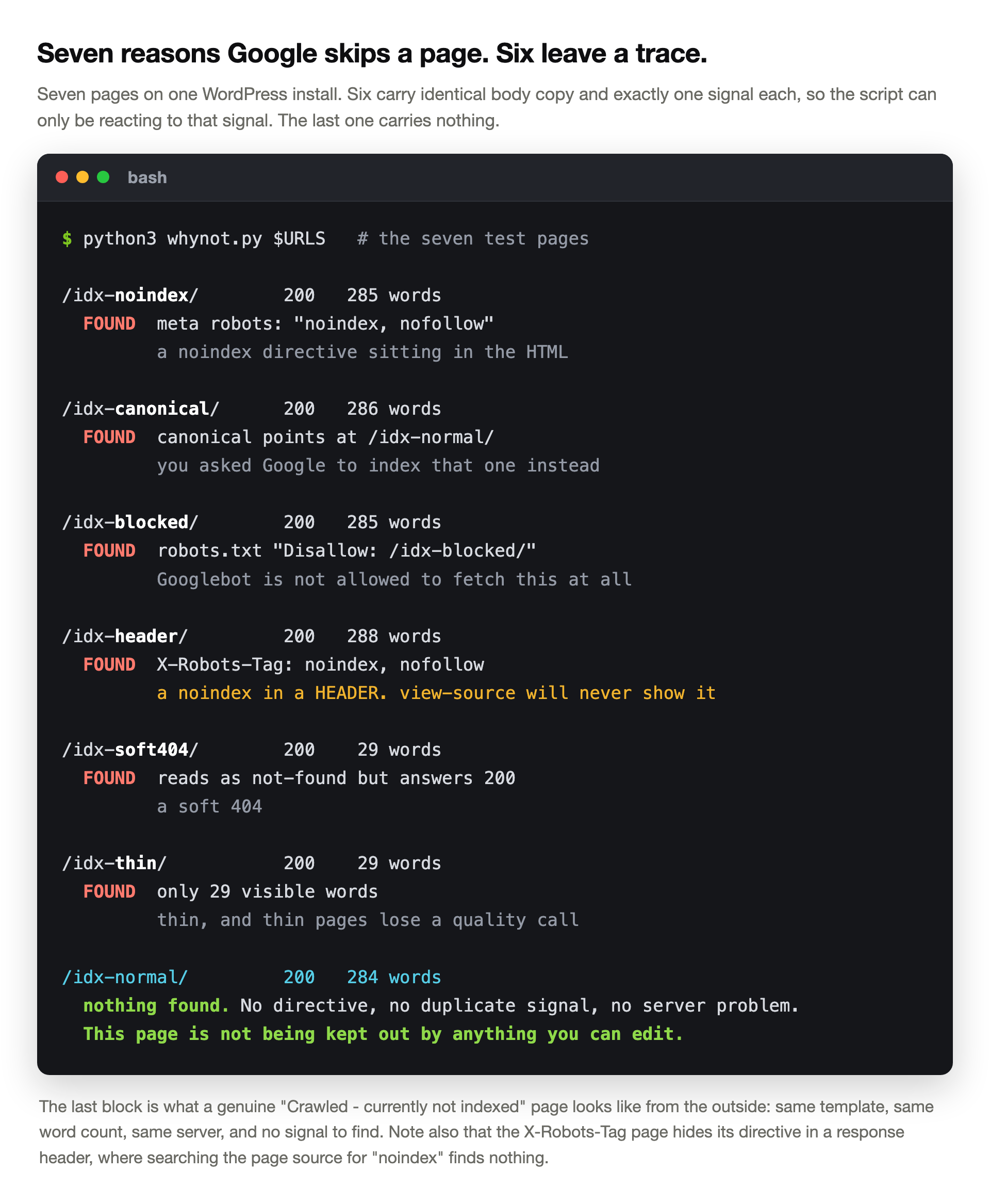
Six pages, six findings. Each one names a thing you can open a file and change.
The last page is the point of the exercise. Same word count, same template, same server, and the script has nothing to report.
From the outside, a genuine “Crawled – currently not indexed” page looks exactly like that. No tag switched it off.
X-Robots-Tag page carries a noindex that never appears in the page source, so “view source and search for noindex” misses it completely. Check the response headers, not the HTML.A detail from building this: Yoast owns the robots meta and the canonical on that install. Setting them through WordPress core’s own filters produced nothing at all.
Worth remembering if you ever try to fix a canonical with a snippet and nothing changes. Your SEO plugin is writing it last.
Then there is the cause nobody checks
A three-week-old site went from 140 clicks a day to zero in a single day. The owner had been thorough:
No noindex tags anywhere, robots.txt returns 200 and allows everything. Googlebot still crawls about 1,000 pages a day and gets only 200 responses, no server errors.
u/baksteentje6, r/SEO, August 2026
Every check passed, because every check was run at a moment when the site was healthy. The replies found it, and the owner posted the answer:
robots.txt and the sitemaps were served by the app itself, so every deploy had a window where they could fail, which is what host status was showing.
u/baksteentje6, in the same thread
When Googlebot cannot fetch robots.txt, it assumes nothing. It backs off the whole site until it can read the file again.
Curl it once and it answers 200. The failure only exists during a deploy, so you will never catch it by hand. Search Console’s Crawl Stats host status is the place it shows.
None of the twelve guides we read mentions this. It is the one technical cause that hides from the usual checks.
Where Google’s attention actually goes
Search Console tells you what Google decided. Your server log tells you what Google did, and the two rarely look alike.
So we read seven days of our own nginx logs. Every request claiming to be Google, checked against Google’s documented method.
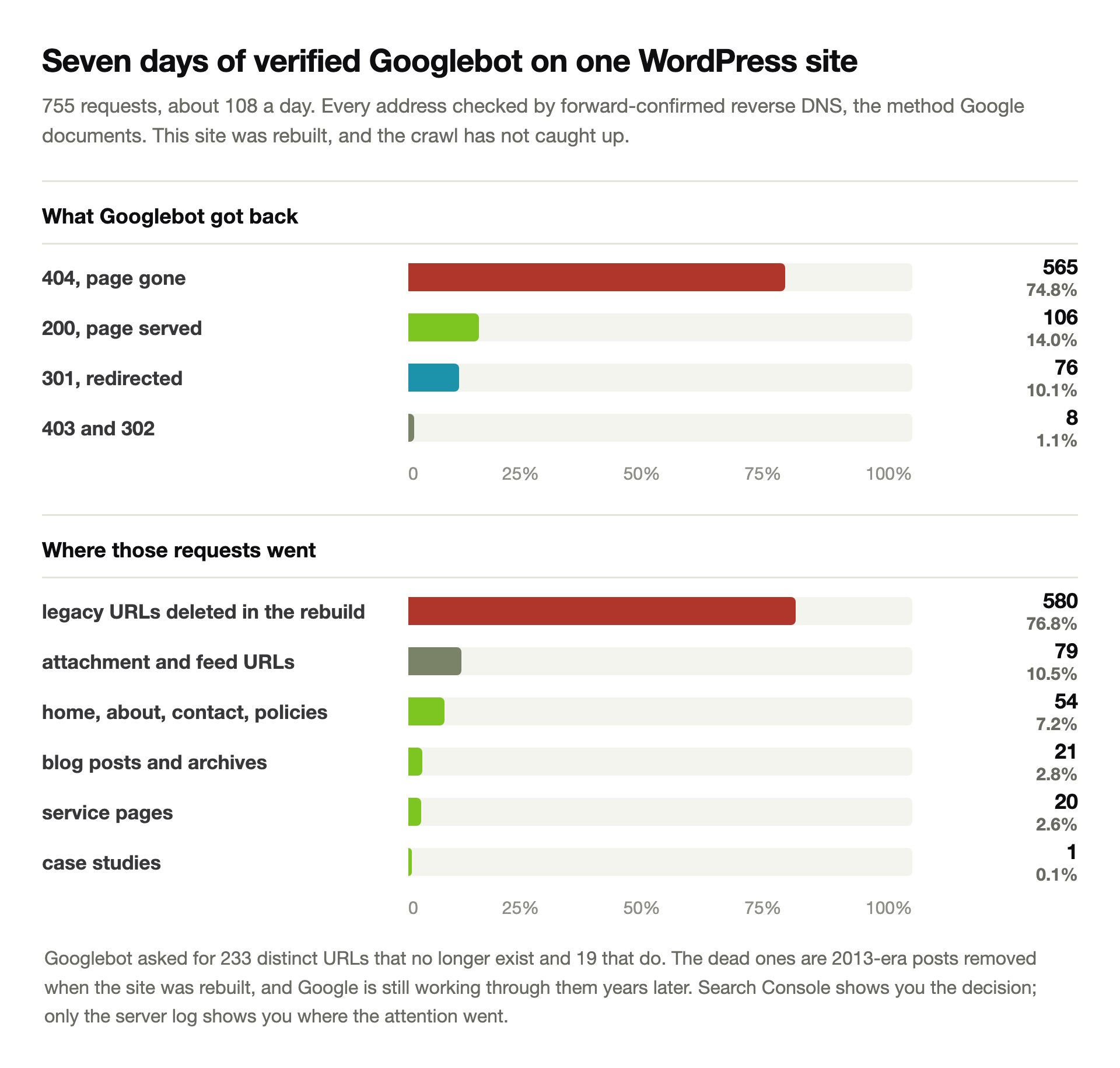
755 verified requests over the week, about 108 a day. Three quarters of them, 565 requests, came back 404.
Googlebot visited 233 distinct dead URLs and 19 live ones. The dead ones are 2013-era posts we deleted when we rebuilt the site.
We should be straight about that. We rebuilt this site, so the ratio is worse than on a site that never moved. Any re-platformed site looks like this for a while.
What it demonstrates holds anyway. Crawling spends a budget, and most of ours went somewhere we never thought to look.
The blog took 2.8% of the week’s requests. Here is how our six published articles actually fared:
| Published article | Googlebot visits in 7 days | Gaps between visits |
|---|---|---|
| Technical SEO checklist | 4 | 57h, 22h, 37h |
| WooCommerce order emails | 4 | 21h, 22h, 25h |
| A WordPress update broke my site | 1 | only one visit |
| White screen of death | 0 | not crawled |
| Japanese keyword hack | 0 | not crawled |
| Why is my WordPress site slow | 0 | not crawled |
Three of six published articles went a full week without a single visit. All of them rank, and all of them sit in the index.
It does reset expectations, though. If Google crawled a page of yours once and then left it alone, that is ordinary, not a verdict.
The log trap that would have fooled us
Our first run reported that none of the 770 Google-claiming requests were real. Every single one failed verification.
That would have been a sensational finding and complete nonsense. The site sits behind a CDN.
// one line from the log, trimmed
104.22.24.140 - - [16/Oct/2026:00:16:17] "GET /mobile-seo/mobile-seo2/"
    404 ... "...Googlebot/2.1..." "192.178.7.41"

// the first address is the CDN edge. the last one is the visitor.
distinct addresses in column 1 ......... 2,339
distinct addresses in the last field ... 647

// checked against column 1
verified Googlebot ..... 0 of 770
// checked against the forwarded address
verified Googlebot ..... 755 of 770
Behind Cloudflare or any CDN, column one of your access log holds the edge server, not the visitor. Every bot analysis built on it is wrong.
Reading the right field made the picture mundane. 33 of 38 Google addresses verified.
Five did not, worth 15 requests, roughly 2%. That matches the going rate for impostors, and it hardly deserves attention.
Google documents how to check an address properly: reverse DNS it, confirm the hostname ends in googlebot.com, google.com or googleusercontent.com, then forward-resolve that hostname and confirm it returns the same address.
The other crawlers now outnumber Google
One number in that week surprised us more than the 404 rate. Nobody went looking for it.
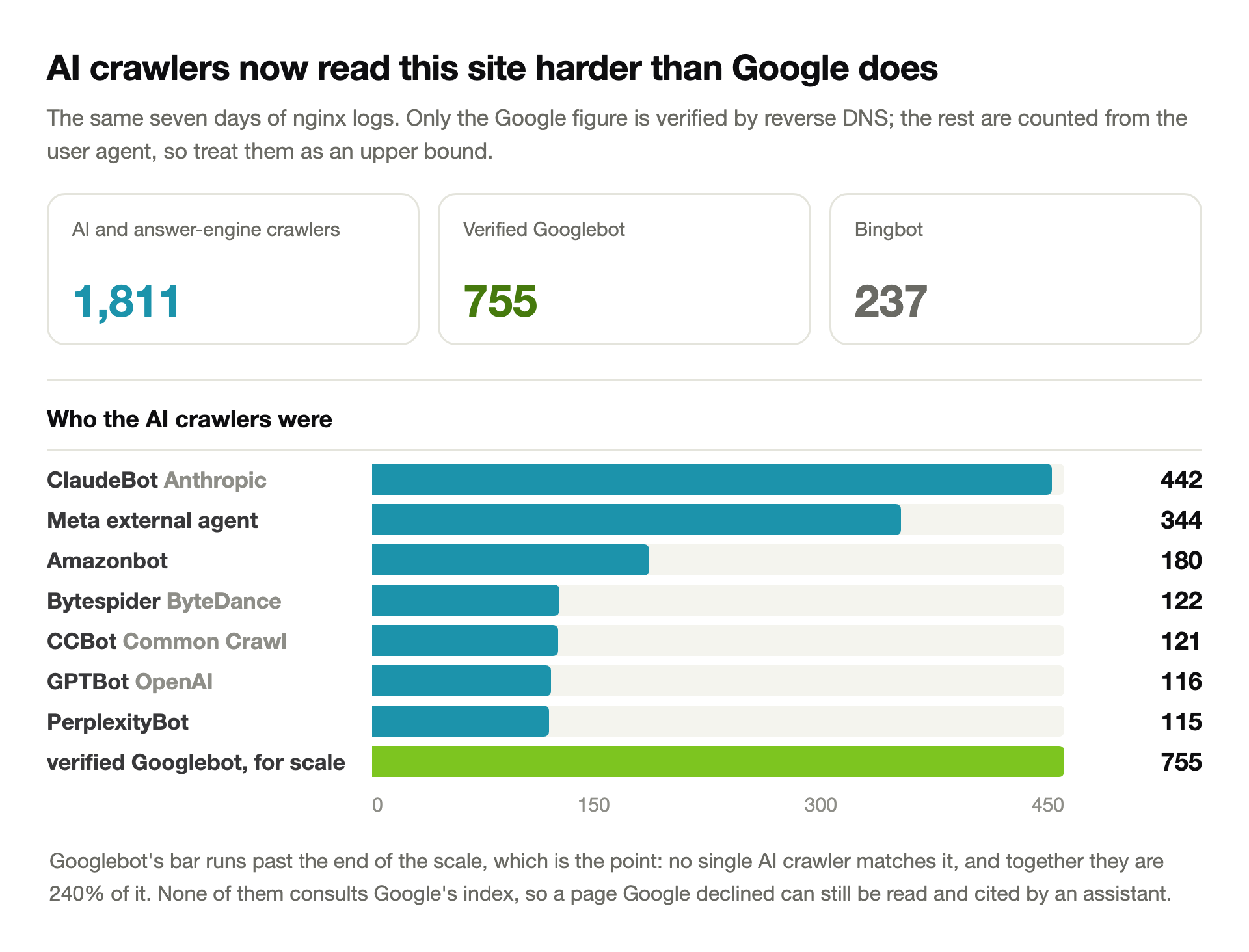
AI and answer-engine crawlers made 1,811 requests in the same seven days. Verified Googlebot made 755.
They are reading this site two and a half times as hard as Google is. ClaudeBot alone came 442 times, more than half Googlebot’s total.
Those counts come from the user agent only. We verified the Google figures properly and did not verify these, so treat them as an upper bound.
It changes what “not indexed” costs you, though. An assistant can still read and quote a page Google declined. None of these bots consults Google’s index.
Which is a reason to fix the page rather than delete it. Thin content earns nothing from either audience; a page worth reading now has two ways to pay off.
Crawl budget is almost certainly not your problem
People blame crawl budget constantly in these threads. Google publishes the thresholds for who should care, and they are not subtle.
| Google’s own guidance on who needs to think about crawl budget |
|---|
| Large sites, 1 million or more unique pages, with content changing about weekly |
| Medium or larger sites, 10,000 or more unique pages, with content changing daily |
| Sites with a large share of their URLs flagged as discovered but not crawled |
| Everyone else: Google says you do not need the guide at all |
A WordPress business site with 40 pages is not in that conversation. Neither is a blog with 400.
Two things Google does say apply to everyone. Crawl capacity drops when a site returns 5xx errors or slows down. Google shares that limit across all of its crawlers.
So a slow or flaky host genuinely does reduce how much Google reads. That is a hosting problem wearing an SEO costume. Rule out the usual causes of a slow site before you look anywhere else.
What actually moves the number
If nothing technical holds the page back, the remaining lever is the judgment itself. Google’s current reading stays consistent, and it reads uncomfortably.
John Mueller has said since 2021 that indexing decisions are “more site-wide” than page-specific. The July 2026 Search Off the Record episode on the indexing report said the same thing again.
Marie Haynes, reviewing cases after that episode, put it more bluntly:
In almost every case I’ve examined these pages have quality issues … good, decent articles, as good as the pages that Google is ranking.
Marie Haynes, reported by PPC Land, July 2026
Read the second half carefully. The pages are not bad. They are as good as what already ranks, and that is now the problem.
Matching the existing results no longer earns a place among them. Google already has that page.
Haynes ties this to the June 2026 spam update and says plainly that she cannot prove it yet. We are repeating her reading, not a finding.
What follows from it is practical enough. Google indexes a page when it carries something the results do not already have.
A measurement, a screenshot of the actual error, a price, a number out of your own data. Something a competitor would have to do real work to copy.
That is why this article has server logs in it rather than a list of tips.
The order to work in
Cheapest checks first. The first four take about ten minutes between them and rule out everything mechanical.
1
Read the response, not the page
Fetch the URL and check the status code, the X-Robots-Tag header, the robots meta, and the canonical. A noindex in a header never appears in view-source, which is where most people look.
2
Check which status you actually have
Crawled and Discovered need opposite work. Crawled means Google read it and declined. Discovered means it never arrived, which is a crawl and linking problem.
3
Open Crawl Stats and look at host status
This is where an intermittent robots.txt failure shows up, and nothing else will reveal it. A deploy window that breaks the file for thirty seconds can hold back a whole site.
4
Count how many pages this hits
One URL is noise. Thirty per cent of your site is a site-level judgment, and no amount of per-page editing will shift it.
5
Read your server log for verified Googlebot
Filter on the forwarded client address if you sit behind a CDN, then reverse-DNS the addresses. You will find out whether Google is spending its visits on pages you deleted years ago.
6
Give the page something the results lack
Not more words. A number, a test, a screenshot, a price, an answer the first ten results do not contain. Competent and duplicative is exactly the band Google skips now.
7
Cut what you cannot improve
Pages that exist to fill a content calendar dilute the site they sit on. Merge them into the page that deserves to win, redirect, and stop defending them.
8
Then wait, and stop resubmitting
Request indexing once after a real change, not weekly. Google says no need to resubmit, and Mueller’s own estimate for site-wide reassessment is months rather than days.
One more thing before you panic about a number that moved. On 9 September 2026, Search Console briefly showed indexed pages as “Crawled – currently not indexed”. Google confirmed it as a reporting bug.
Check a few URLs with a site: search before you rebuild anything.
Pages sitting in this status for months?
We read the response headers, the server log and the index coverage together. Then we tell you which of the seven causes you have. If it is the quality call we say so, instead of selling a technical fix that cannot work.
See how we work on indexingWhat twelve guides leave out
We read twelve guides to this status, all published or updated within the last two years. We set aside three more for age.
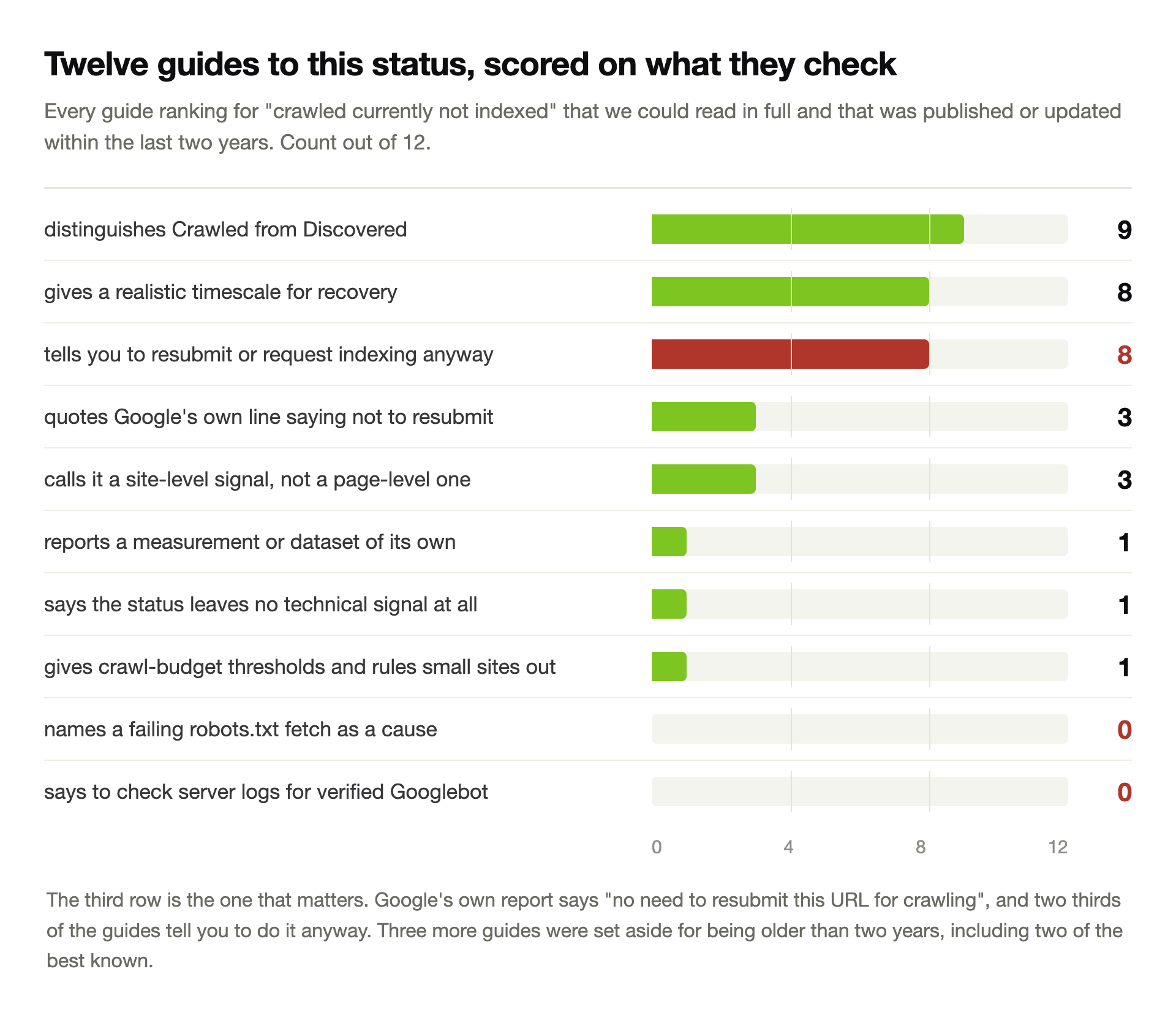
The advice in all twelve is broadly sound. Check your canonicals, improve the content, add internal links.
What is missing is the part that tells you when to stop. Nobody says the status leaves no technical trace. So readers keep auditing a page with nothing wrong with it.
Two are better than the rest. WP Consults quotes Google’s own line and calls the status “not something a tag on your site switched on”. It also publishes its own count: 323 affected URLs out of 525.
Digital Applied is the only one to give the crawl-budget threshold and tell small sites to drop it. Its line: “rule crawl budget out and move on.”
Three things we would not claim
Plenty of articles put a percentage on how often this status is a quality call. We have no way to know that, and neither does anyone without Google’s data.
Our 74.8% figure covers one site over seven days, and we had rebuilt that site. It shows a pattern worth checking in your own logs, not a benchmark.
We also did not test whether requesting indexing works. One site’s result would prove nothing either way, so we quoted Google’s documentation instead.
The AI crawler counts come from user agent strings alone. We verified the Google numbers and not those, and we have said so twice because it matters.
Questions people ask us
What does “Crawled – currently not indexed” actually mean?
Google fetched your page successfully, read it, and decided against adding it to the index. Access was fine, and no directive played any part.
That makes it the one status with nothing on the page to find. We built seven test pages, one per cause, and a script found the signal on every one except this.
Should I click Request Indexing to fix it?
Google’s own report says “no need to resubmit this URL for crawling”. Eight of the twelve guides we read tell you to do it anyway.
A manual request can push one URL through, which is why the habit persists. It does not change the judgment behind the others. The daily limit will never keep up with a real publishing schedule either.
How long does it take to get indexed after I fix the page?
For a single improved page, days to a few weeks. For a site-level quality judgment, Mueller’s own estimate has been months rather than days.
Our logs put the reality in perspective. Googlebot skipped three of our six published articles for a whole week. All three rank, and all three sit in the index.
What is the difference between Crawled and Discovered, currently not indexed?
Discovered means Google knows the URL and has not fetched it yet, so it has judged nothing. Crawled means Google read it and declined.
They need opposite work. Discovered points at crawl capacity, server speed and internal links. Crawled points at what the page offers that the results do not already have.
Is crawl budget why my pages are not indexed?
Almost certainly not. Google’s own threshold starts at a million unique pages, or ten thousand that change daily. Below that, Google says you do not need the guide.
One part does apply to everyone. Google crawls less when a site returns 5xx errors or gets slower. It also shares that capacity limit across every one of its crawlers.
How do I check whether Googlebot really visited my page?
Read your server log, then verify the address the way Google documents it. Reverse DNS the address. Confirm the hostname ends in googlebot.com, google.com or googleusercontent.com, then forward-resolve it and check it matches.
Behind a CDN, check the forwarded client address rather than the first column. Ours held 2,339 edge addresses against 647 real ones. Reading the wrong one told us every Googlebot visit was fake.
Can a page be useful even if Google will not index it?
Increasingly, yes. In the week we measured, AI and answer-engine crawlers made 1,811 requests here. Verified Googlebot made 755.
None of them consults Google’s index, so a page Google skipped can still be read and cited. That is an argument for improving a page rather than deleting it.
Should I delete pages stuck in this status?
Only the ones you cannot improve. Pages written to fill a calendar dilute the site around them. Merging one into the page that deserves to win usually beats keeping both.
Redirect what you remove. Our logs show Googlebot still requesting URLs deleted years ago, at 233 distinct dead addresses in one week.