
Technical SEO problems rarely throw an error. Google simply never indexes a page, or it picks the wrong URL. Rankings stall and nothing warns you.
This checklist puts the fixes in the order they cause damage. Indexing comes first, then which URLs Google sees, then speed, structure and schema. We tested each WordPress behaviour on a WordPress 7.1 demo site. For everything else, we quote Google’s own documentation.
The checklist, in priority order
| 1. Google may index the site | “Discourage search engines” is off, your main pages carry no noindex, and the Page indexing report looks sane. |
| 2. robots.txt only controls crawling | Never block a URL you want Google to drop. It needs to crawl the page to see the noindex. |
| 3. One URL per page | https, one host name and one trailing-slash style, each reached with a single 301. |
| 4. One honest sitemap | Only indexable URLs, with a true lastmod. Google ignores priority and changefreq. |
| 5. Thin WordPress URLs handled | Attachment pages off, author archives noindexed on one-author sites, filter URLs blocked. |
| 6. Core Web Vitals pass | LCP within 2.5 s, INP within 200 ms, CLS at 0.1 or less, for real mobile visitors. |
| 7. Internal links reach every page | No orphan posts. Paginated pages keep their own canonical. |
| 8. Structured data from one source | Valid and matching the page. It earns rich results, not rankings. |
| 9. Re-check after every big change | Redesigns, migrations and plugin swaps break the items above. |
Why technical SEO comes before content
A page can only rank after Google crawls it, indexes it and settles on its URL. Most pages never get that far. Ahrefs found that 96.55% of the pages in its index get no traffic from Google at all.
Weak content explains much of that. Technical faults are another cause, and they hold back good pages as well.
WordPress runs 40.3% of all websites, according to W3Techs. Its defaults are mostly sensible. Still, the same settings, themes and plugins cause the same few problems on site after site. This list targets those.
1. Make sure Google is allowed to index the site
One checkbox causes more damage than any other WordPress setting. Under Settings > Reading sits “Discourage search engines from indexing this site”. Developers tick it while they build, and nobody remembers to untick it at launch.
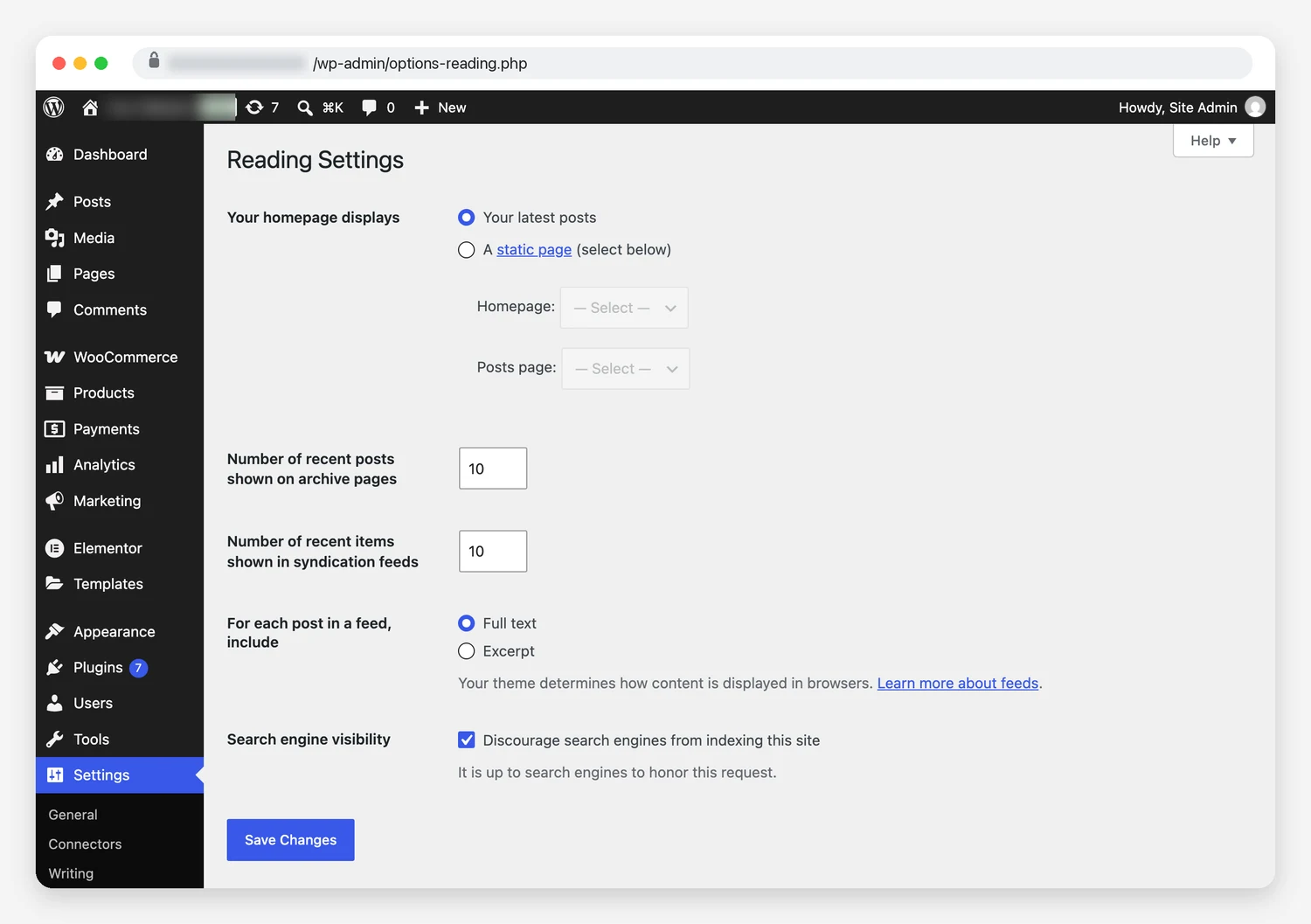
Several popular guides still say this box edits robots.txt. WordPress 5.3 changed that. We ticked it on our demo site and compared the output before and after:
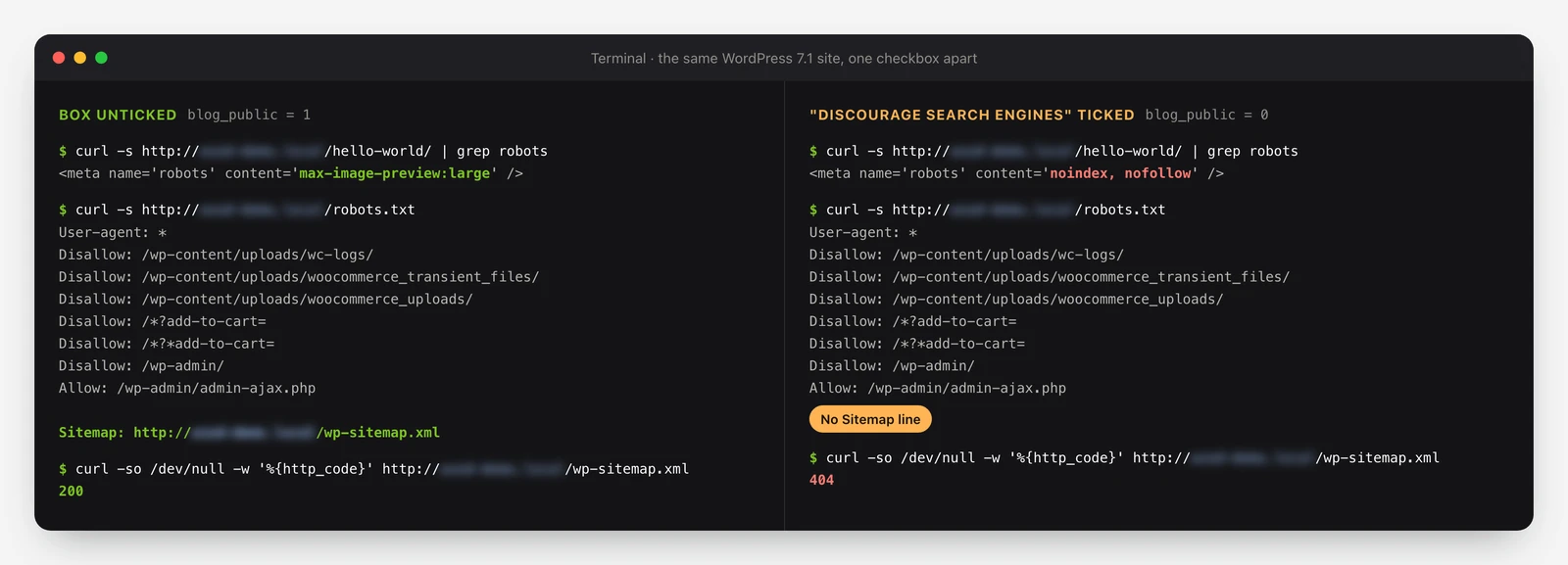
Three things changed. Every page gained a noindex, nofollow robots tag. The Sitemap line disappeared from robots.txt. And /wp-sitemap.xml started returning 404, which the WordPress 5.5 sitemap notes say will happen.
Unticking the box fixes the setting, not the damage. Google has to recrawl each page before the noindex goes away. Resubmit the sitemap in Search Console and request indexing for your most important pages.
One WordPress site owner found out the hard way:
I had said option checked for months and now Google does not show my website even when I type in the exact URL when I paste it into Google Search.
Dave203LP, r/Wordpress
A reply further down that thread was blunter about the setting:
Most lethal and unnecessary settings option ever.
geistly36, r/Wordpress
Look for noindex from other sources
The checkbox is only one way to noindex a page. SEO plugins set robots rules per post type and per page, and some themes add their own.
Open the source of an important page and search for “robots”. Check the X-Robots-Tag response header too, because a server can send noindex without touching the HTML.
Read the Page indexing report
Search Console’s Page indexing report gives a reason for every URL left out of the index. These four statuses cause most of the confusion on WordPress sites:
| Status | What Google says it means | What to check on WordPress |
|---|---|---|
| Crawled – currently not indexed | Google crawled the page but chose not to index it. There is “no need to resubmit”. | Thin or duplicate pages: tag archives, near-empty posts, old attachment pages. Improve them or noindex them. |
| Discovered – currently not indexed | Google found the URL but postponed the crawl, because it “was expected to overload the site”. | Slow server responses, hosting limits, or thousands of low-value URLs competing for crawls. |
| Duplicate without user-selected canonical | Google chose another page as the canonical and will not show this one. | Missing canonical tags, parameter URLs, or two plugins printing different canonicals. |
| Indexed, though blocked by robots.txt | Google indexed the page even though robots.txt blocks it. | A robots.txt rule on a page you wanted gone. Remove the block, then use noindex. |
Some URLs stay out for a long time. One Reddit user described a WordPress site where the problem hit only a couple of pages:
…two specific pages have never been indexed for over two years, while all other pages on the site index normally.
Difficult-Plate-8767, r/bigseo
2. Use robots.txt for crawling, not for hiding pages
robots.txt tells crawlers where they may go. Google says plainly that it “is not a mechanism for keeping a web page out of Google”. A blocked page can still land in the index if other sites link to it.
The usual WordPress mistake stacks both tools. Someone noindexes a page, then blocks the same URL in robots.txt to be safe. Google’s noindex documentation says the page “must not be blocked by a robots.txt file”. A crawler that cannot fetch the page never sees the tag.
WordPress search results show how this plays out. Core adds noindex, follow to them, and our demo site served it on /?s=test. If search URLs already sit in Google’s index, leave them crawlable until they drop out. Blocking them earlier hides the very tag that removes them.
Leave the default WordPress rules for /wp-admin/ alone. Avoid blocking theme CSS or JavaScript, since Google renders pages much like a browser does.
Search Console does not always make this easier. A WordPress owner who had just added AI crawler rules to robots.txt wrote:
I wish google would just tell you which line of robots.txt is giving it a problem instead of just vaguely saying something in the file is blocking it.
me_on_the_web, r/Wordpress
The robots.txt report in Search Console helps here. It shows the version Google fetched and when, which narrows down the rule to blame.
AI crawlers and llms.txt
robots.txt now carries AI crawler rules too. Blocking Google-Extended stops Google using your content to train Gemini models and to ground their answers. Google states that it “does not impact a site’s inclusion in Google Search”.
llms.txt is optional. Google’s AI optimization guide says Google Search ignores these files, so they “will neither harm nor help”. The 2025 Web Almanac found llms.txt on about 2% of sites. AIOSEO generated 39.6% of those files, so most exist because a plugin made one.
For AI Overviews, plain crawl access matters more. Google’s AI features page asks site owners to allow crawling “in robots.txt, and by any CDN or hosting infrastructure”. Check the bot protection at your host or CDN for that reason.
3. Give every page one URL
One page can answer at several addresses. Think http and https, www and non-www, and URLs with or without a trailing slash. Every extra version competes with the real one unless it redirects.
Core handles part of this. On our demo site, /?p=1 returned a 301 to the clean permalink. So did a URL missing its trailing slash. An uppercase version of the URL returned 200, but its canonical tag pointed back to the lowercase address.
The site address is your job. Enter the https URL under Settings > General. Then force https and one host name at the server or CDN, and test all four combinations. Our own site sends http and https, with and without www, to one address in a single 301.
Google rates redirects and rel=”canonical” as strong signals and sitemap inclusion as a weak one. It also warns against using robots.txt for canonicalization.
Map redirects before a redesign goes live
A new theme or a permalink change can move hundreds of URLs in one afternoon. Export every old URL first and give each one a 301 to its new home. Then crawl the old list and check that no URL passes through a chain of redirects.
Skipping that step hurts. After their company moved its WordPress site to a different page builder, one marketer wrote:
We switched from using one pagebuilder in WP to another (Divi). Still on WP as CMS. I’m sweating marbles as it seems like this major drop in traffic will cost me my job.
worlds2get, r/TechSEO
4. Keep one small, honest sitemap
WordPress has published a sitemap at /wp-sitemap.xml since version 5.5. Each file holds up to 2,000 URLs. Yoast, Rank Math and most SEO plugins replace it with their own.
Pick one sitemap and remove the other. Two systems give Google two lists that drift apart. Include only URLs that return 200, allow indexing and use themselves as the canonical.
Leave out the old fields. Google ignores priority and changefreq. It reads lastmod, but only while the dates stay true. When Google retired sitemap pings in 2023, it warned that it would eventually stop believing fake dates.
Small sites gain little from a sitemap. Google’s sitemap overview says a site of “about 500 pages or fewer” may not need one. That assumes good internal links. Submit it in Search Console anyway. It costs nothing and surfaces errors.
5. Close the WordPress URLs that create thin pages
WordPress creates archive and helper URLs on its own. Most do no harm. A few can multiply into hundreds of near-empty pages.
Attachment pages
Every uploaded image used to get its own page, with almost nothing on it. WordPress 6.4 switched these pages off for new installs only. On sites upgraded from an older version, WordPress sets the option to 1 and the pages stay live.
Run wp option get wp_attachment_pages_enabled to check. A 1 means the pages exist. wp option update wp_attachment_pages_enabled 0 turns them off. After that, attachment URLs redirect to the file itself, as ?attachment_id=6 did on our demo site.
Author and tag archives
On a one-author blog, /author/name/ repeats the main post list. Our demo site’s author archive was indexable and listed in the core sitemap. It also opened from ?author=1, which revealed the admin’s login name in the URL.
Noindex author archives on single-author sites, or switch them off in your SEO plugin. Tags need judgement instead of a rule. A tag used on one post makes a near-empty page, while a well-used tag can rank.
Search, comment and filter URLs
Our demo site already served noindex on its search results and on ?replytocom comment links. You rarely need to touch those.
WooCommerce filters are harder. Every combination of size, colour and price can become its own URL. Google’s faceted navigation guide warns these can “generate infinite URL spaces”.
If you don’t need filter URLs indexed, Google recommends blocking them in robots.txt. It calls canonical tags and nofollow “less effective in the long term” for this job.
The numbers get out of hand quickly. One WooCommerce store owner posted this from Search Console:
14,000 pages aren’t indexed. I have 6,000 pages indexed.
I have 150 product pages on my site. Could the filters be causing the issues?
thricetone, r/woocommerce
That is the one place where a robots.txt block beats noindex. Those URLs have no value to searchers, so Google never needs to see them.
6. Fix Core Web Vitals where WordPress is weakest
Core Web Vitals measure how real Chrome users experience a page. Google’s thresholds apply at the 75th percentile of page loads:
- Largest Contentful Paint (LCP): 2.5 seconds or less.
- Interaction to Next Paint (INP): 200 milliseconds or less.
- Cumulative Layout Shift (CLS): 0.1 or less.
INP replaced First Input Delay on 12 March 2024. Plenty of ranking checklists still list FID, so check which metric a guide is talking about.
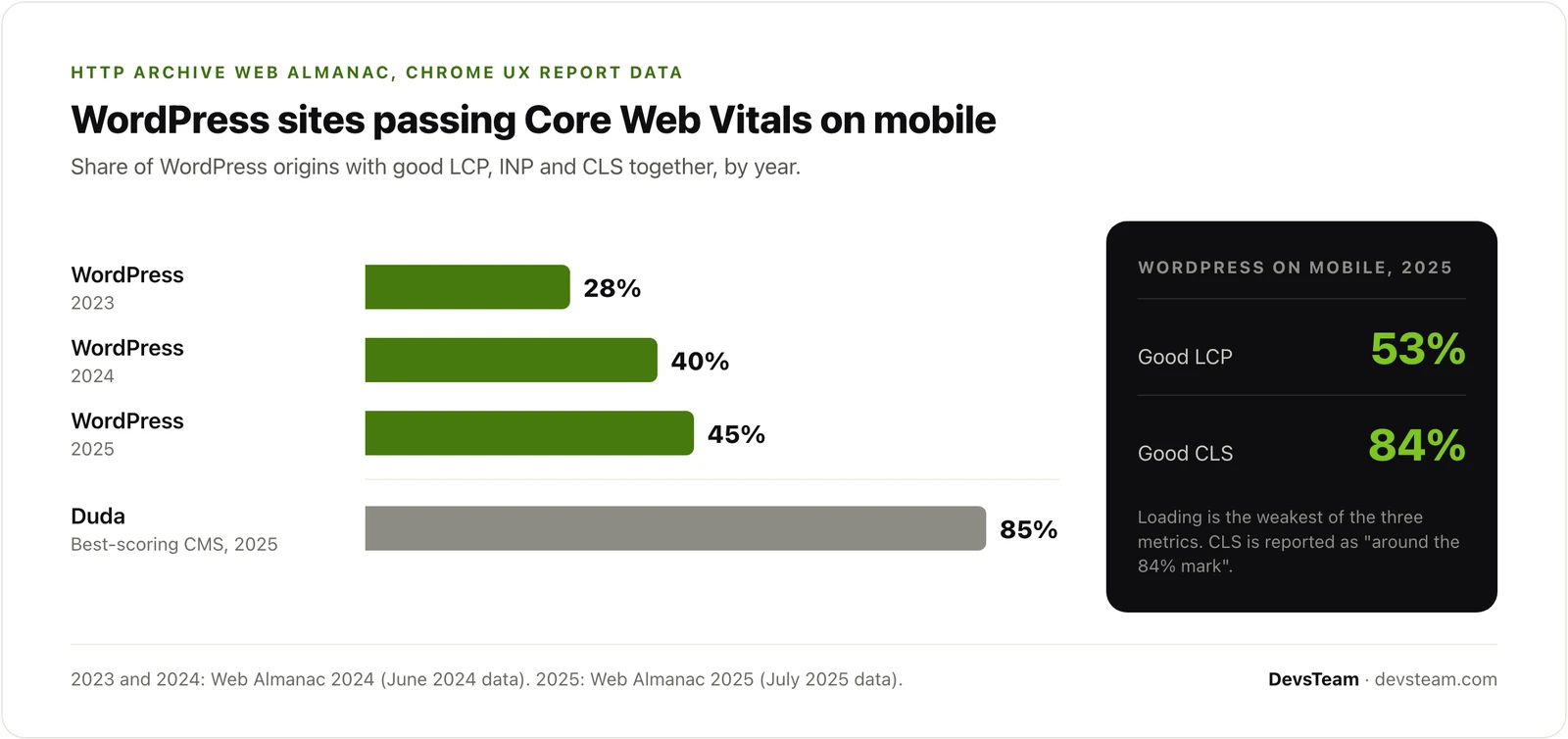
The trend is improving. The 2024 Web Almanac recorded 28% of WordPress sites passing on mobile in 2023 and 40% in 2024. The 2025 edition put WordPress at 45%, among the lowest in its table. Duda led with 85%.
Loading is the weak spot. Only 53% of WordPress sites had a good LCP on mobile, against roughly 84% for CLS. Page builders are part of the picture. Among page builders on mobile, Elementor’s adoption was 43%, more than double the block editor’s 18%.
WordPress fixes that move LCP
- Keep the hero image out of lazy loading. Since WordPress 6.3, core adds
fetchpriority="high"to the image it expects to be the LCP. Page builders and optimisation plugins can undo that. - Cache full pages at the server or CDN, so the HTML arrives before anything else can wait on it.
- Serve images at the size they display, in WebP or AVIF.
- Cut front-end scripts. Every plugin that loads JavaScript on every page competes with your content.
Scripts hide more weight than most owners expect. Take a WooCommerce store we worked on. Its homepage had no checkout, yet Stripe and the hCaptcha it pulled in made up 65% of the page. After that fix and several others, mobile PageSpeed went from 59 to 91.
Hosting and caching alone may not fix it. A WooCommerce owner listed what they had already tried:
I have done everything I could do, from implementing all sorts of caching, optimizing the database, implementing Cloudflare PRO + APO + Polish + Zaraz, and buying an expensive and highly powerful managed server. I have also asked more than 10+ developers for help and they all failed.
myysoul, r/Wordpress
The cause turned out to be query strings that lowered the cache hit rate, as the owner later posted. Before paying for a bigger server, check how often your cache serves a page.
Judge the result by field data. PageSpeed Insights lab scores help you debug, but Search Console’s Core Web Vitals report shows what real visitors got. That gap is where speed work aimed at real-visitor data earns its keep.
7. Build internal links Google can follow
Internal links show Google which pages matter and how they relate. A post with no links pointing at it is an orphan. Google may find it through the sitemap, but it gets little weight.
Link each new post from older posts on the same topic. Keep important pages a few clicks from the homepage. Write anchor text that describes the destination, never “click here”.
Pagination needs just one rule. Google’s pagination guide says it no longer uses rel=”next” and rel=”prev”. It also says not to use page one as the canonical for later pages. Let page 2, page 3 and the rest each name themselves.
For a larger example, look at a radio directory we built. Its sitemap, schema and redirects live inside the theme. Google had indexed 106 of its pages on 1 June 2026, and 861 by 4 September.
8. Add structured data from one source
Structured data helps Google understand a page and qualifies it for rich results. It does not lift rankings. Google’s John Mueller put it bluntly in April 2025: “Structured data won’t make your site rank better.” Search Engine Roundtable covered the remark.
Two popular types lost their search features in 2023. Google now shows FAQ rich results only for “well-known, authoritative government and health websites”, and it deprecated How-to results. FAQ markup can still describe a page accurately. Just don’t add it expecting the dropdowns.
Duplication is the WordPress problem here. A theme, an SEO plugin and a schema plugin can each print their own Article or Organization markup. Test an important page in Google’s Rich Results Test and count the items. Keep one source for each type.
Turning schema off in one place is not enough if something else still prints it. One owner found this after disabling schema in their SEO plugin:
When I inspect the page source, I can clearly see two separate JSON-LD blocks, both with
Purple_Remove_4491, r/Wordpress"@type": "FAQPage". One is mine, and the other seems to be injected by something else
Their theme turned out to be the source. It printed its own FAQ markup until they switched that off in the theme settings.
9. Re-check after every big change
Most breakage happens during ordinary work: a redesign, a migration, a new cache layer or a swapped plugin. Run these checks on launch day:
- Nobody left “Discourage search engines” ticked, and your main pages carry no noindex.
- robots.txt still points to the right sitemap.
- Old URLs reach their new home in one 301.
- The sitemap returns 200 and lists only indexable URLs.
- A page from each template passes the Rich Results Test without duplicates.
- You watch the Page indexing and Core Web Vitals reports for the following weeks.
- Indexed page counts have not jumped. Thousands of URLs you never wrote usually point to spam pages injected by a hack.
Crawl budget rarely belongs on that list. Google’s crawl budget guide targets sites with a million or more pages, or 10,000 or more that change daily. A typical WordPress site is far below both.
Some owners would rather not run this list themselves. Our WordPress SEO work starts with the technical foundation and fixes it in code, before any content work begins.
Want these checks run on your site?
Send us the URL. We check indexing, redirects, sitemaps, Core Web Vitals and schema, then send a prioritised list in plain English. Free, and read only.
Get the free site auditFrequently asked questions
What is technical SEO for WordPress?
It is the work that lets Google crawl, index and understand your pages. On WordPress that means robots rules, redirects, canonical tags, sitemaps, archive pages, Core Web Vitals and structured data. Content and links build rankings on top of it.
Does “Discourage search engines” block Google from crawling my site?
No. Since WordPress 5.3 it adds a noindex, nofollow robots tag instead of a robots.txt block. It also switches off the core sitemap. Pages already indexed can drop out, and they return only after Google recrawls them.
Why are my WordPress pages “Crawled – currently not indexed”?
Google crawled them and chose not to index them. Usually the pages add little, like thin posts, tag archives or attachment pages. Resubmitting will not help. Improve the page, merge it with a stronger one, or noindex it.
Should I block tag, author or search pages in robots.txt?
Usually not. Use noindex, because Google must crawl a page to see that tag. WordPress already noindexes search results. The exception is WooCommerce filter URLs, where Google recommends a robots.txt block.
Do I need an SEO plugin for technical SEO?
Core WordPress already outputs a sitemap, robots meta tags and canonical tags. A plugin adds per-page control, cleaner archives and schema. Use one SEO plugin only, because two print competing titles, canonicals and markup.
What are good Core Web Vitals scores?
Aim for LCP within 2.5 seconds, INP within 200 milliseconds and CLS of 0.1 or less. Google measures them at the 75th percentile of real page loads. INP replaced FID in March 2024.
Does my WordPress site need an llms.txt file?
Not for Google. Its AI optimization guide says Google Search ignores these files. Crawl access matters more, so make sure robots.txt, your host and your CDN let Googlebot through.
Does structured data improve rankings?
No. It helps Google understand a page and can make it eligible for rich results. Since 2023, FAQ rich results appear only for authoritative government and health sites, and How-to results are gone.
How often should I run a technical SEO audit?
Check after every redesign, migration, theme change or SEO plugin swap, since those cause most breakage. Between changes, we suggest a quick look at the Page indexing and Core Web Vitals reports each month.
