Your site feels slow. You run a speed test, and the test says your site is fine.
A freelancer on r/WordPress described that exact trap this July:
every speed test I run gives really good results (95–100 performance, around 1.3s load time, Grade A, etc.), but when I am actually in the website, it still feels slow.
IDoujyan, r/Wordpress
Both things are true at once. That is the part nobody explains.
We read 19 articles ranking for this question. Every one of them lists hosting, plugins, caching and images. Not one of them separates the two different problems people call “slow”.
So we measured all nine causes below on a real WordPress install. The numbers here come from that install, not from someone else’s blog post.
The short version
| Two problems, one word | The server thinking, and the browser working. Different symptoms, different fixes. |
| Caching has a blind spot | We measured 0.005s for a visitor and 0.108s for the logged-in owner. Same page, same second. |
| It is not the plugin count | Of nine active plugins, four cost anything measurable. Five cost nothing at all. |
| Geography is a real cause | The same page took 0.030s from the local edge and 1.29s when the server had to answer. |
| WordPress is not bloated | It ships less JavaScript than Wix or Shopify, and still passes Core Web Vitals least often. |
| Measure before you change | Google ranks on real visitor data. Most speed tools show you a simulation instead. |
First, work out which slow you have
Two completely different failures share one word. Sorting them takes about a minute, and it decides everything you do next.
There are two different slow problems, and the fix for one does nothing for the other
Work out which side of the line your complaint sits on before you change a setting. Nearly all the advice online answers the browser half, and plenty of real complaints belong to the server half.
The server is thinking
You notice it in wp-admin. Saving a post crawls. The cart takes a beat. A page cache cannot touch any of it.
- Hosting that throttles you rather than stopping you
- Every logged-in request skipping the cache
- Cart, checkout and account pages, live by design
- A database answering more than it needs to
- A server on the wrong continent from your visitors
The browser is working
A visitor sees a blank screen, then a jump. The server did its job in 200 ms and the page still took six seconds.
- Third-party scripts loading on pages that do not need them
- Images far larger than the space they fill
- A builder shipping CSS and JS for features not on the page
- Fonts and render-blocking files ahead of the first pixel
- Taps that do not respond, which is a separate metric again
Open your site in a private window, logged out. Watch how long the browser waits before anything at all appears.
Quick and then jumpy? Your server is doing its job. Your problem lives in the browser.
Still a long blank pause? Then the server is the bottleneck, and no image plugin will rescue it.
One developer put this split more bluntly than we would dare to:
To start, TTFB, or Time To First Byte, can’t be resolved within WordPress.
Wolfeh2012, r/Wordpress
He is broadly right. Time to first byte is your server answering. Google’s guidance puts a good TTFB at 0.8 seconds or less.
The tool you are measuring with may be lying to you
Here is the gap that produces the quote at the top of this article. Most speed tools run a simulation on a rented machine somewhere.
Google does not rank you on that. It uses field data from real Chrome users, gathered in the Chrome UX Report. Its verdict comes from the 75th percentile of your visitors.
Three quarters of your visitors have to be having a good time. Not the test server in Iowa.
Of the 19 competitor articles we read, zero mention that distinction. All of them send you to a lab tool.
The thresholds themselves are simple. Largest Contentful Paint under 2.5 seconds, Interaction to Next Paint under 200 milliseconds, layout shift under 0.1.
Part one: slow before anything arrives
These five causes happen on your server. The visitor sees a blank browser tab. You see a dashboard that crawls.
1. Your host is throttling you, not failing
Shared hosting rarely breaks outright. It queues you instead, and the queue only shows up under load.
That is why the support reply is always “we ran tests and everything looks normal”. At that moment it was normal.
One developer traced a four second delay to the machine underneath, not to anything in WordPress:
The frontend was blazing fast (thanks to Cloudflare + WP Rocket), but the backend was practically unusable. Editing a product took 10 seconds to save.
Italcan, r/Wordpress
Sometimes the hardware alone is the answer. Another commenter changed nothing else at all:
My site was averaging 9 sec page loads. I moved to a server with a newer chip and more RAM, no other changes, load speed drops to 1.5 sec.
Comfortable-Web9455, r/Wordpress
The fix. Ask your host two specific questions. Is my account hitting a CPU or entry-process limit, and can you show me the last seven days?
Vague answers are an answer. Check your PHP version too. WordPress.org’s own live figures show about 63% of installs below the recommended 8.3. Another 16.9% still run 7.4.
2. Your cache skips the people who are complaining
This one surprises almost everybody, so we measured it properly. A page cache went on a clean install, configured the normal way.
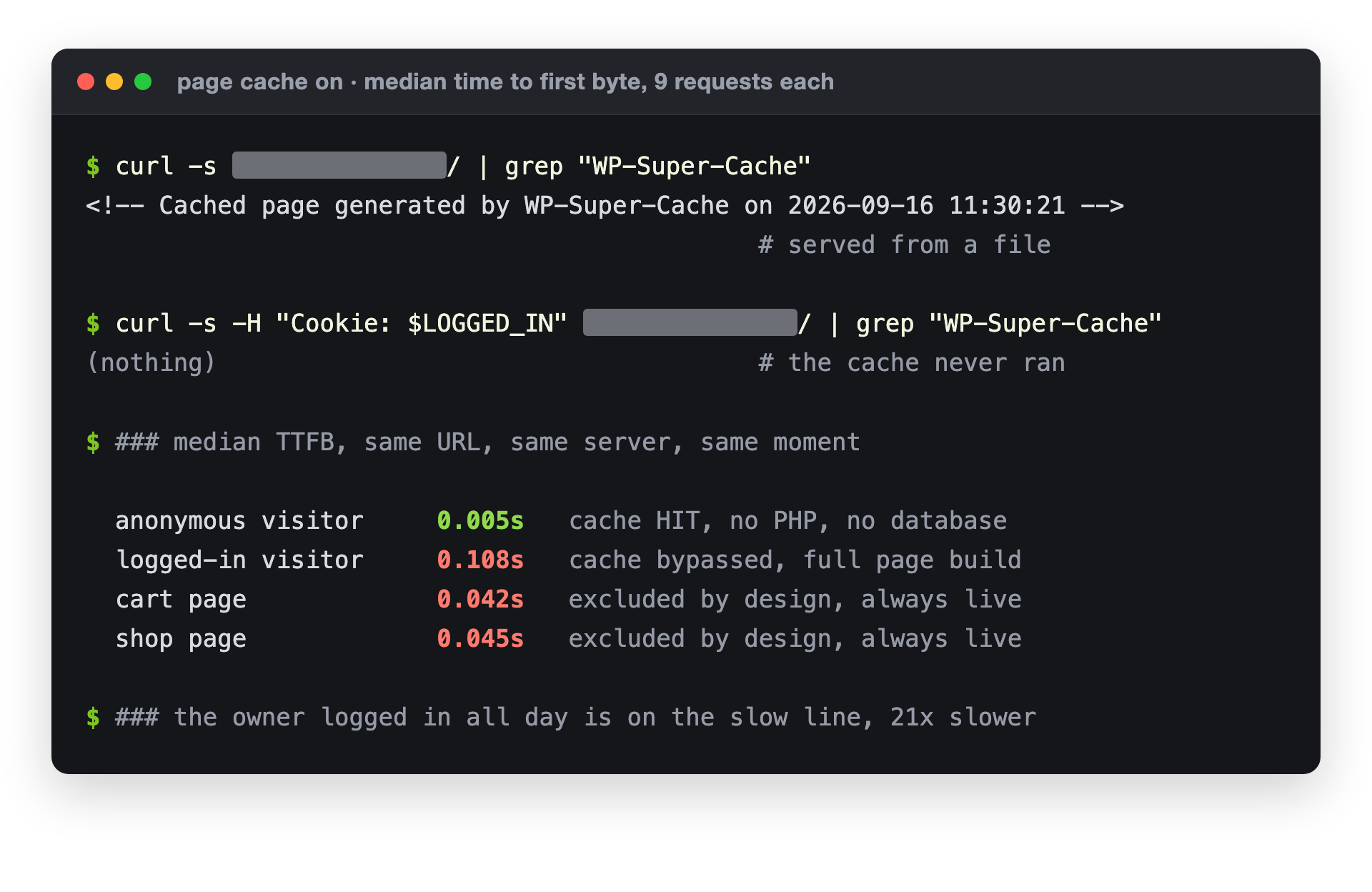
An anonymous visitor got a file straight off disk in 0.005 seconds. No PHP ran. Nothing touched the database.
Signed in, the same URL took 0.108 seconds. That is 21 times slower, and it is working exactly as designed.
Caches exclude logged-in sessions on purpose. Otherwise a stranger could land on one person’s private dashboard.
Now look again at who complains about a slow site. The owner, sitting in wp-admin all day, never once touching the fast path.
I have a webpage that is not the fastest, but not slow either. My WordPress admin, however, is absurdly slow.
No_Worry5419, r/Wordpress
Staff feel it as lost hours. A B2B store owner described the cost in September:
We have sales reps on the road using mobiles and tablets that complain about slow admin processes such as searching for products, adding admin orders and all general back end admin processes.
Bocksie, r/Wordpress
On the same install the dashboard took 0.109 seconds. The plugins screen took 0.119, the posts list 0.134. Every one of those numbers scales badly on a real server under real load.
The fix. A page cache cannot help here, so stop expecting it to. Object caching with Redis, a faster PHP version and fewer admin-side queries are what move this number.
3. Cart, checkout and account pages are live by design
The same blind spot has a commercial version. In our test the cart page took 0.042 seconds while the cached home page took 0.005.
Those pages hold one person’s basket, so they can never come from a shared file. Every visit runs PHP and queries the database.
Which means your slowest pages are the ones that take money. We wrote up what that costs a store and how we approach it separately.
The fix. Time the checkout itself with a real test order. A green home page score tells you nothing about it.
4. A few heavy plugins, not “too many plugins”
Eleven of the 19 articles we read repeat the advice to reduce your plugin count. We tested that claim one plugin at a time.
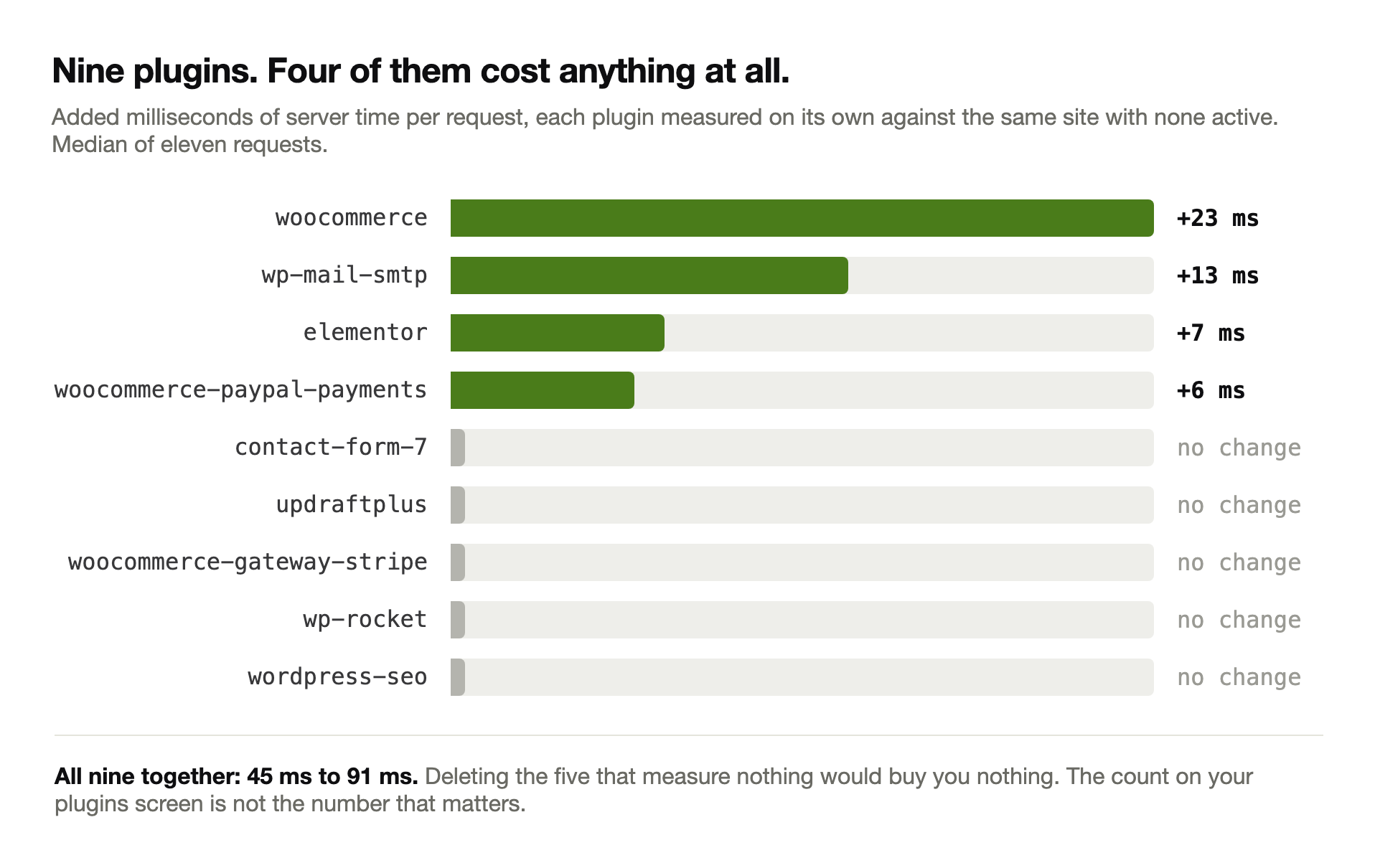
WooCommerce added 23 milliseconds per request. WP Mail SMTP added 13. Elementor added 7.
The other five measured nothing at all. Deleting them would have bought us zero.
Weight is the thing, never the number on your plugins screen. A site with 30 light plugins can beat a site with 8 heavy ones.
The fix. Measure before you delete. Turn one plugin off, load the page ten times, write down the median, turn it back on.
5. Your server is on the wrong continent
Distance costs milliseconds that no optimisation can recover. We proved it on our own site, which is a useful thing to be able to do.
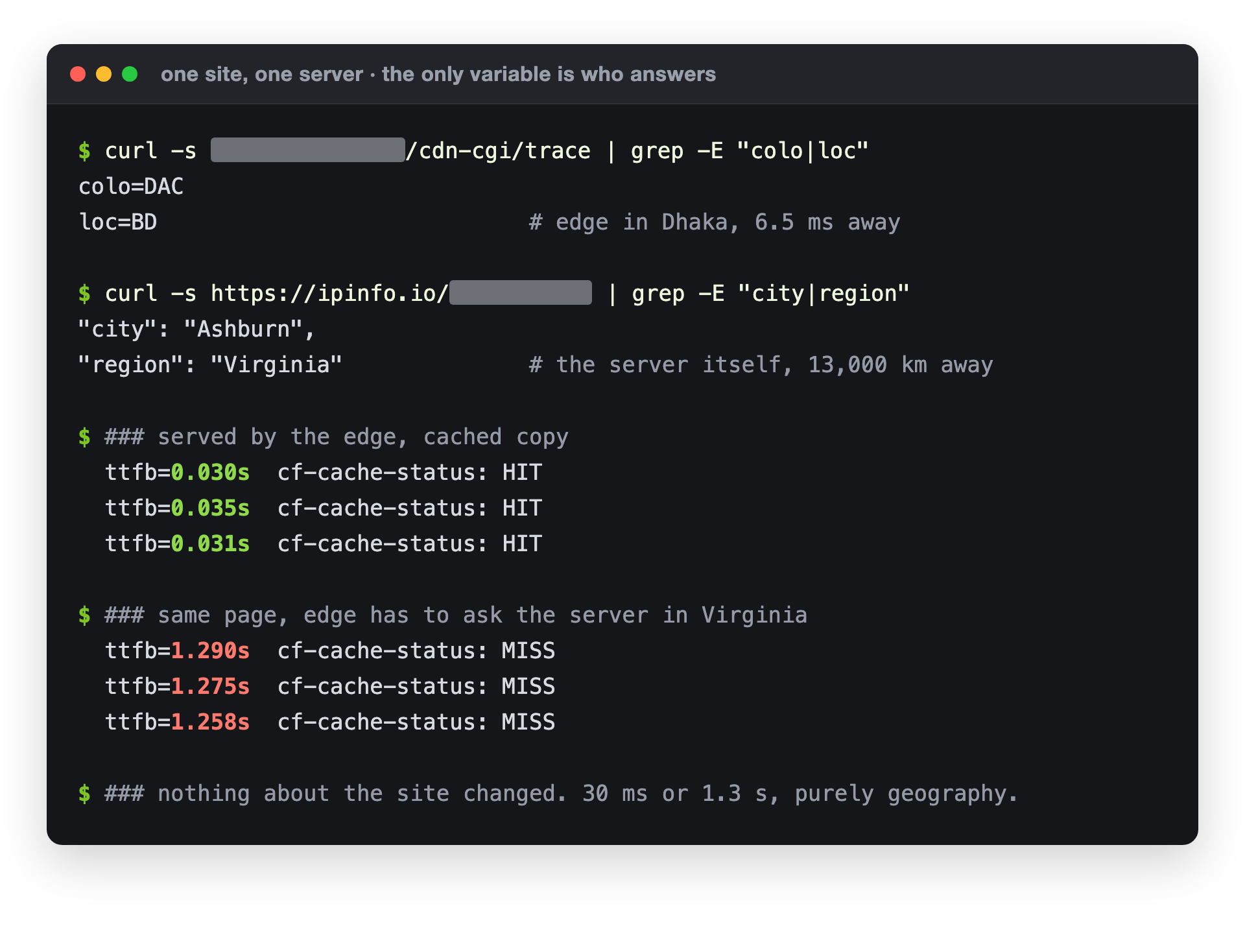
Our server sits in Ashburn, Virginia. We are in Dhaka, about 13,000 km away.
When the local CDN edge had a copy, the page arrived in 0.030 seconds. When it had to ask Virginia, the same page took 1.29 seconds.
That is a 43-fold difference caused entirely by geography. It also explains why a site can feel fast to you and slow to your customers.
The fix. Host near your audience, then put a CDN in front. Check that the CDN is actually caching pages, not just images.
Part two: slow after it arrives
Your server answered in 200 milliseconds and the page still took six seconds. Everything below happens inside the visitor’s browser.
6. Third-party scripts loading where they do not belong
This is the biggest single win we have found on real client work, and it hides well. Someone adds a script once, and it loads everywhere forever.
On a Swiss store we rebuilt the performance of, the payment gateway’s JavaScript weighed 1,925 KB. The captcha it pulled in added another 750 KB.
Together that was 64% of a 4.11 MB home page. A home page with no checkout on it.
Scoping those scripts to the pages that need them took the page from 4.11 MB to 1.44 MB. Mobile PageSpeed went from 59 to 91.
The fix. Open your browser’s network tab and sort by size. Anything from a domain that is not yours deserves a hard question.
7. Images far larger than the space they fill
Everyone lists this one, so we will be quick. The median mobile page now carries 911 KB of images.
Two details slip past most people. Images without width and height attributes make the page jump as it loads. The median page carries two of them.
The second is format. WebP and AVIF cut file sizes hard. Only 3 of the 19 articles we read mention AVIF at all.
The fix. Convert to WebP, set explicit dimensions, and never upload a 4000px photo into a 600px slot.
8. Your builder ships code for features you are not using
Page builders now run an estimated 60% of WordPress sites, with Elementor alone on 43% of mobile ones. They earn that popularity honestly.
The cost is generic CSS and JavaScript on every page. HTTP Archive’s researchers put it plainly. Recent improvements “do not completely erase the performance gap between builder-heavy sites and more tightly controlled builds”.
Before you blame the builder, though, read this correction from a long-standing developer:
This isn’t Elementor’s fault – the site has been poorly built and is on bad hosting. Unfortunately this is a common issue when people complain about Elementor.
bluesix_v2, r/Wordpress
He is right often enough to matter. Rebuilding a working site is expensive, risky and usually unnecessary.
The fix. Turn on conditional asset loading, remove widgets you never use, and cut the font families down to two.
9. It is not slow, it is unresponsive. Or it has been hacked
Two very different endings share this slot. People report both as “slow”, and neither is a loading problem.
The first is interaction delay. A page can paint in a second and still ignore taps for another two.
Google measures that separately as Interaction to Next Paint. Total blocking time on the median mobile page rose 58% in a year, to 1,916 milliseconds.
The second ending is uglier. Injected spam, hidden redirects and crawler floods all make a site slow. Only one of the 19 articles mentions it.
If slowness arrived suddenly with no change on your side, rule this out early. Our guide to spam pages injected into a site without the owner noticing covers what to look for.
The fix. Cut the JavaScript that runs on load. Then read your server logs for bot traffic you are paying to serve.
Three things everyone repeats that we could not reproduce
Research turned up three claims we expected to confirm. Testing them changed our mind on all three.
WP-Cron slows down every page load
We scheduled a task that deliberately takes three seconds, made it due, then loaded the page. The request finished in 0.112 seconds.
The task still ran. WordPress fires it in a separate non-blocking request, so the visitor never waits.
Since version 6.9 it moved later still, onto the shutdown hook. Cron now runs after your page has already gone out.
Autoloaded options are killing your database
We timed the query that loads them, then grew the table on purpose and timed it again.
| Autoloaded data | Query time | Verdict |
|---|---|---|
| 76 KB, a normal site | 0.78 ms | Invisible |
| 1 MB | 1.48 ms | Still invisible |
| 3.9 MB | 6.91 ms | Worth cleaning |
| 12.8 MB | 20.68 ms | A real problem |
So it is real, and it is small until it is enormous. Check yours before spending an afternoon on it.
WordPress is slow because it is bloated
The data says the opposite, and this was the most surprising thing we read all week.
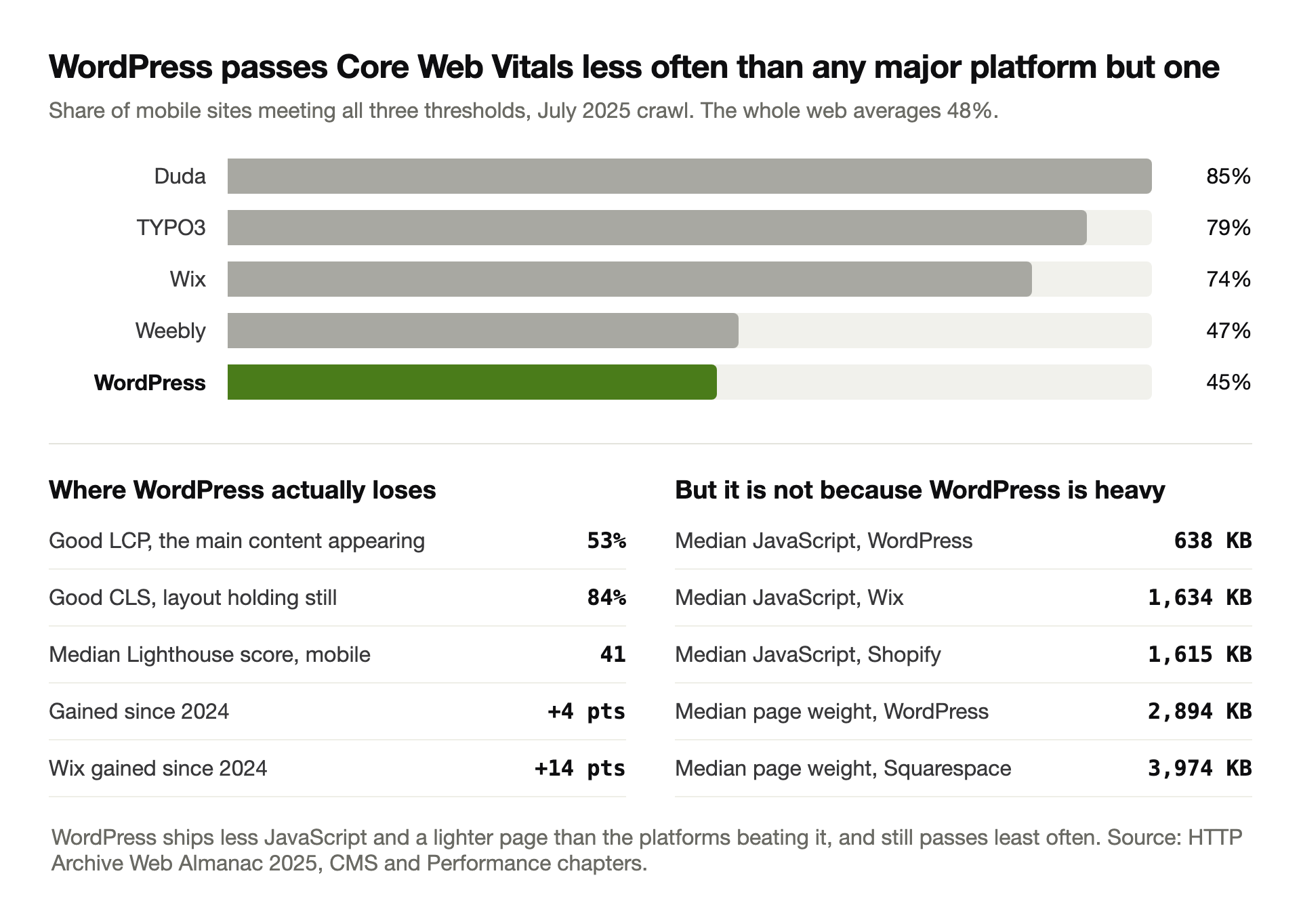
WordPress ships 638 KB of JavaScript on a median mobile page. Wix ships 1,634 KB and Shopify 1,615 KB.
Yet only 45% of WordPress sites pass Core Web Vitals on mobile. Wix manages 74% and Duda 85%. The whole web averages 48%.
The Almanac’s own explanation is the useful bit. WordPress performance varies “driven more by configuration than by core limitations”.
Read that as good news. Nothing structural is stopping your site from being fast.
Why this keeps happening to the same sites
Nobody owns the problem, so it bounces. A freelancer described the loop exactly:
I contacted the hoster. Sadly they told they did somme researches and tests and there are no problem on their part. They told me it’s a problem from our side and we need to correct it. They think it’s a Plugin problem. So we’re going round in circles.
Kins, WordPress.org support forums
Meanwhile the owner starts guessing. This is the most honest sentence in our entire research file:
At this point I feel like I’m just clicking random optimization buttons without understanding anything.
kuftikufti, r/Wordpress
Guessing has a cost. One recipe blogger took forum advice, installed two recommended plugins, and came back a day later:
Before it was slow, but still perfectly functional. Now it’s slow to the point of being unusable, and many images aren’t loading at all.
bastecutfold, WordPress.org support forums
Mobile makes it worse, because that is where the failures concentrate and where the work is fiddliest:
So this is why I was looking for a fast way to make it optimized for mobile because the alternative, going CSS by CSS, is making me want to cry.
Royah Marie, WordPress.org support forums
Even a paid fix can fail to stick, which is a fair thing to worry about before hiring anyone:
It was realizing I’d be paying someone to fix a score that would just break again the next time I edited a page, on a site I couldn’t confidently touch myself.
rowdeyy, r/Wordpress
He is describing something real. Speed decays as soon as pages change. That is why keeping a site fast is ongoing work rather than a one-off job.
An admin screen that takes 40 seconds is not a score problem either. One owner reported exactly that, on hosting with plenty of headroom:
I have since two days the same effect but only at wp-admin. It takes up to 40sek. until the selected page is displayed. I have a plesk hosting, WP is at 6.4. More than enough resources.
oskar321, WordPress.org support forums
Does any of this actually pay for itself?
Honest answer: the famous statistics on this are mostly untraceable. We went looking for primary sources and threw most of them out.
The Amazon “100ms costs 1% of sales” line traces back to a 2006 conference talk and nothing else. We could not find a primary source for the Walmart figure either.
Two studies do survive checking. Vodafone ran a real split test. It found that a 31% improvement in LCP raised total sales by 8%.
Deloitte studied 37 brands across 30 million sessions for Google in 2019. A 0.1 second improvement lifted retail conversions 8.4% and average order value 9.2%.
Both studies carry a brand with an interest in the answer. They remain the best evidence available, and the direction is consistent.
Want to know which of the nine is yours?
We measure your site the way Google does and name the specific cause. Target numbers go in writing before you pay anything.
Get a free speed auditWhen to stop and hand it over
Plenty of this list is yours to fix. Compressing images, dropping a font, scoping a script: all reasonable weekend work.
Some of it is not. Call someone when the admin is unusable, or when the checkout is your slowest page. Call them when two caching layers are fighting each other.
Call sooner if changes made it worse. That is the point where guessing has started costing more than help would.
And if the site stops responding entirely rather than merely dragging, that is a different emergency. Our guide to the blank page WordPress shows when PHP gives up covers that case.
Whatever you do, find the cause before changing a setting. Nine causes look identical from the outside, and eight of the fixes will do nothing for you.
Questions people ask us
Why is my WordPress admin slow when my site is fast?
Because page caching deliberately skips logged-in users. We measured the same URL at 0.005 seconds for a visitor and 0.108 seconds for an admin. Your dashboard builds itself from scratch every time. Object caching and PHP speed matter far more there than any caching plugin.
How many plugins is too many for WordPress?
There is no correct number. We measured nine active plugins. Only four added any server time at all, and WooCommerce accounted for half of that. Judge each plugin by what it costs on your site, not by the length of your plugins list.
My PageSpeed score is 95 but the site still feels slow. Why?
A score is a simulation run on a rented machine. Google ranks using real visitor data from Chrome, measured at the 75th percentile. A high lab score with a poor field score points elsewhere. Usually the cause is slow interactions or layout shifts.
Will switching hosts fix my slow site?
Sometimes, and sometimes not. One developer we quote moved to newer hardware and went from 9 seconds to 1.5 with no other change. Another switched hosts and the problem followed. Measure your server response time first, because that tells you whether the host is even involved.
Does WP-Cron slow down my site?
Not the way most articles claim. We scheduled a three-second task, made it due, and the visitor request still finished in 0.112 seconds. WordPress spawns cron in a separate non-blocking request. Since version 6.9 it runs on the shutdown hook, after your page has gone out.
Is WooCommerce slower than regular WordPress?
It adds real work, yes. WooCommerce cost 23 milliseconds per request in our test, more than every other plugin combined. The bigger issue is cart, checkout and account pages. A cache can never hold them, so they run live PHP on every single visit.
Is my page builder the reason my site is slow?
Often it contributes, but rarely alone. Builders load generic CSS and JavaScript on every page, which adds weight. Poor hosting, uncompressed images and too many fonts usually cost more. All three are far cheaper to fix than a rebuild.
Can a hacked WordPress site cause slowness?
Yes, and it is worth ruling out when slowness appears suddenly. Injected spam pages, hidden redirects and the crawler traffic they attract all consume server resources. Check for pages you did not create, and get the site cleaned properly before optimising anything.