You cleaned the site. The scanner is green, the files are fresh, every password is new.
Three days later it is back.
Reinfection is not a sign that you missed a file. It usually means the attacker still has a way in, and a file cleanup never touches that. We rebuilt the whole thing on a test install to show you which parts survive.
The short version
| Deleting files does not delete the schedule | Our schedule row sat in wp_options after we deleted every file carrying the payload. Both checksum commands still said Success. |
| Application passwords outlive your reset | A password reset, a salt rotation and a session wipe all left it answering HTTP 200. |
| Salts stop a stolen cookie, nothing else | They do not remove an account, a schedule row or an API credential. The session rows stay in the database too. |
| Your integrity check has holes | Two of twelve plugins here refuse to verify. Themes have no verify command in WordPress at all. |
| A clean restore can reopen the hole | Ours rolled one plugin back 56 releases in 0.7 seconds, six times faster than the patch it undid. |
| Hunt the access, not the payload | Five queries, none slower than 1.8 ms, name every account and credential that can walk back in. |
One case, with timestamps
In August 2026 a site owner posted a full write-up to the WordPress support forums. It is the clearest record of a reinfection I have read, because they logged the order.
Their cleanup was not lazy. They removed the files, the database rows, the scheduled events and the hidden admin. Then they rotated the WordPress password, the database password, the cPanel password and all eight keys and salts.
Wordfence scanned clean afterwards. The next morning this happened.
07:37
A new administrator account appears, with a session token attached to it.
09:37
The db.php drop-in comes back.
09:38
Both scheduled events come back, four minutes of work.
09:59
The remaining files reappear.
The account came first. Two hours of quiet, then the files. Whoever did this logged in before writing anything.
Given that all credentials and salts were rotated, what re-entry path would still be available to the attacker?
thamario, WordPress support forums, August 2026
That is the right question, and almost nobody answers it. The rest of this article does, with measurements.
What a file cleanup actually reaches
A WordPress site is two things. The install we tested holds 16,291 files, plus a database.
Scanners live in the first one. Wordfence, Sucuri, Imunify and the rest read files, hash them, compare them. Good tools, honest work.
A Wordfence engineer put the limit plainly on the support forums. The person asking had a clean scan and an obviously dirty site.
The infection may be in a database table that our plugin doesn’t scan.
wfphil, Wordfence support, WordPress support forums
So we built a test. On a throwaway WordPress 7.1.3 install we added one small plugin with a name nobody could mistake for real.
It registers a scheduled hook. The hook writes a plain text file.
Nothing executable, no network access, no obfuscation. We only needed to know what the cleanup would catch.
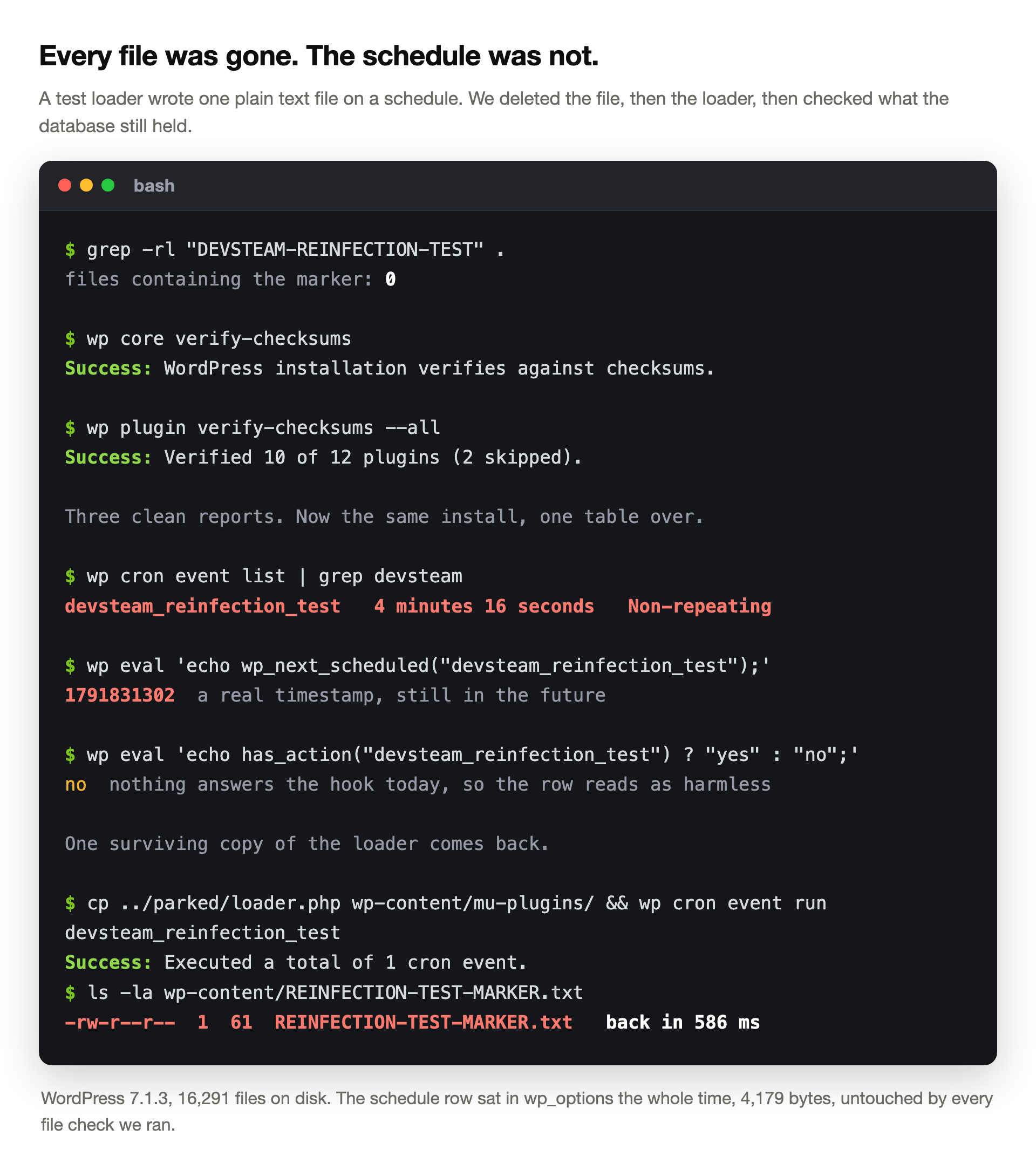
The schedule is a row, and rows do not care about file cleanups
Scheduling the hook added 187 bytes to one option row. That is the entire footprint.
We deleted the file it wrote. On the next run it came back in 610 ms.
Then we did the thorough version: delete the payload and the plugin that made it. A full-disk grep for the marker returned zero files.
wp core verify-checksums reported Success. wp plugin verify-checksums --all reported Success.
One table over, nothing had touched the schedule. wp cron event list still showed the hook. wp_next_scheduled() still returned a real future timestamp.
Here is the detail that makes this hard to spot. With the plugin gone, nothing registers the custom interval, so WordPress displays the event as Non-repeating.
The row looks like harmless debris. It is a loaded slot waiting for a callback.
We copied one spare copy of the plugin back. The payload file returned 586 ms later.
Real campaigns keep more than one spare. Monarx documented a WordPress family in August 2026 that runs nine independent persistence mechanisms.
Their write-up names a cron event called sc_cron_fetch. A separate hourly job reinstalls the main file whenever it goes missing.
That is the same hook name the forum poster found on their site.
Even after cleaning, resetting permissions, changing themes, and making index.php read-only (chmod 444), the malware kept coming back within minutes. After hours of digging, I found the real source wasn’t a plugin or theme vulnerability.
u/ShipDependent, r/Wordpress, November 2025
Theirs turned out to be a cron entry in the hosting panel. Same shape, one layer lower. WordPress schedules its own jobs in the database, so both layers need checking.
The credential that survived everything we rotated
Application passwords arrived in WordPress 5.6. They let a phone app or a script authenticate to the REST API without your real password.
Each one is a separate hash, stored in a usermeta row. The official integration guide tells developers they can use one “directly in lieu of the account’s real password”.
The guide never says what happens to it when you reset that account password. So we measured.
We made one application password on a second administrator account. Then we ran the standard cleanup steps, one at a time. After each step, one real HTTP request to /wp-json/wp/v2/users/me.
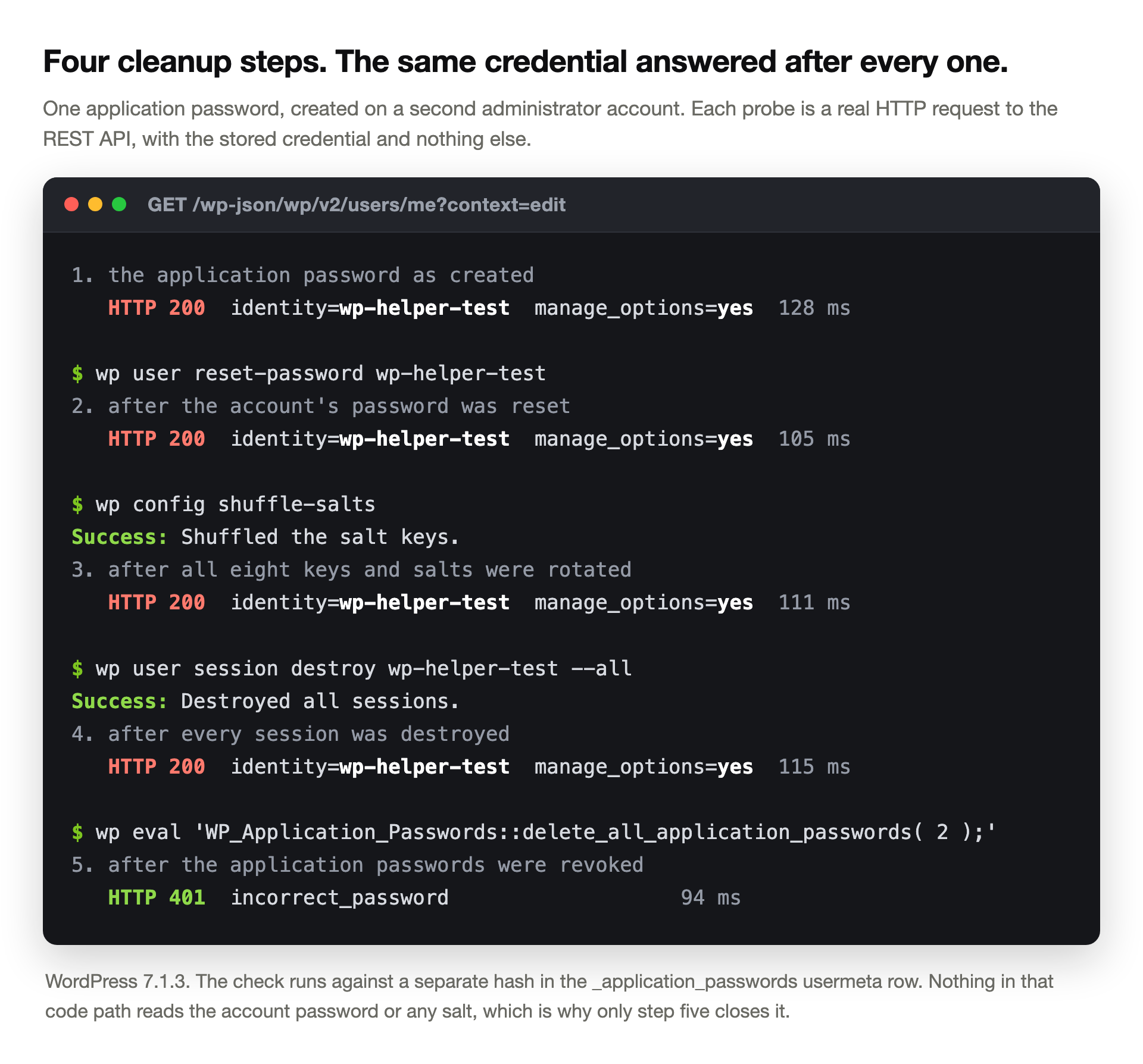
Password reset: HTTP 200. All eight keys and salts rotated: HTTP 200. Every session destroyed: HTTP 200.
Each time the API handed back the full administrator profile, with manage_options set. Only revoking the application passwords themselves produced a 401.
Read the code and the reason is obvious. The check runs against the hash in the _application_passwords usermeta row. Nothing in that path reads the account password, and nothing reads a salt.
One more thing makes it quiet. You cannot use an application password on the login form at all.
No failed login, no lockout, no alert. Your security plugin watches a door this credential never uses.
What each cleanup step actually kills
Rotating salts is good advice given for the wrong reason. It invalidates cookies, because WordPress builds the cookie hash from them. It does nothing to anything else.
We counted the session rows before and after. Two before. Two after.
Rotation does not remove them, it only stops the matching cookie validating.
Resetting your own password
Stops someone reusing that one password. Leaves every other account, every application password and every scheduled row exactly where it was.
Rotating the eight keys and salts
Kills stolen cookies across the whole site. A rogue account with its own password simply logs in again.
Destroying sessions
Clears the session rows. Our test credential still returned HTTP 200 straight afterwards, because it was never using a session.
Deleting the malicious files
Removes today’s payload. The schedule, the accounts and the API credentials are all stored somewhere a file scanner does not look.
Reinstalling WordPress core
Replaces core only. Your database, your uploads, your paid plugins and your theme come through untouched.
Read that list against the forum case at the top. They did four of the five. The attacker needed one account they had not found.
I have identified every malicious files incl php files and deleted them But the user is automatically created with different id
u/Thriller2610, r/Wordpress, November 2025
Your integrity check has two holes in it
Checksum verification compares your files against the official copies. For core and directory plugins it works well.
We wrote one identical harmless file into two plugins to find the edge. One came from the plugin directory, one was a paid plugin.
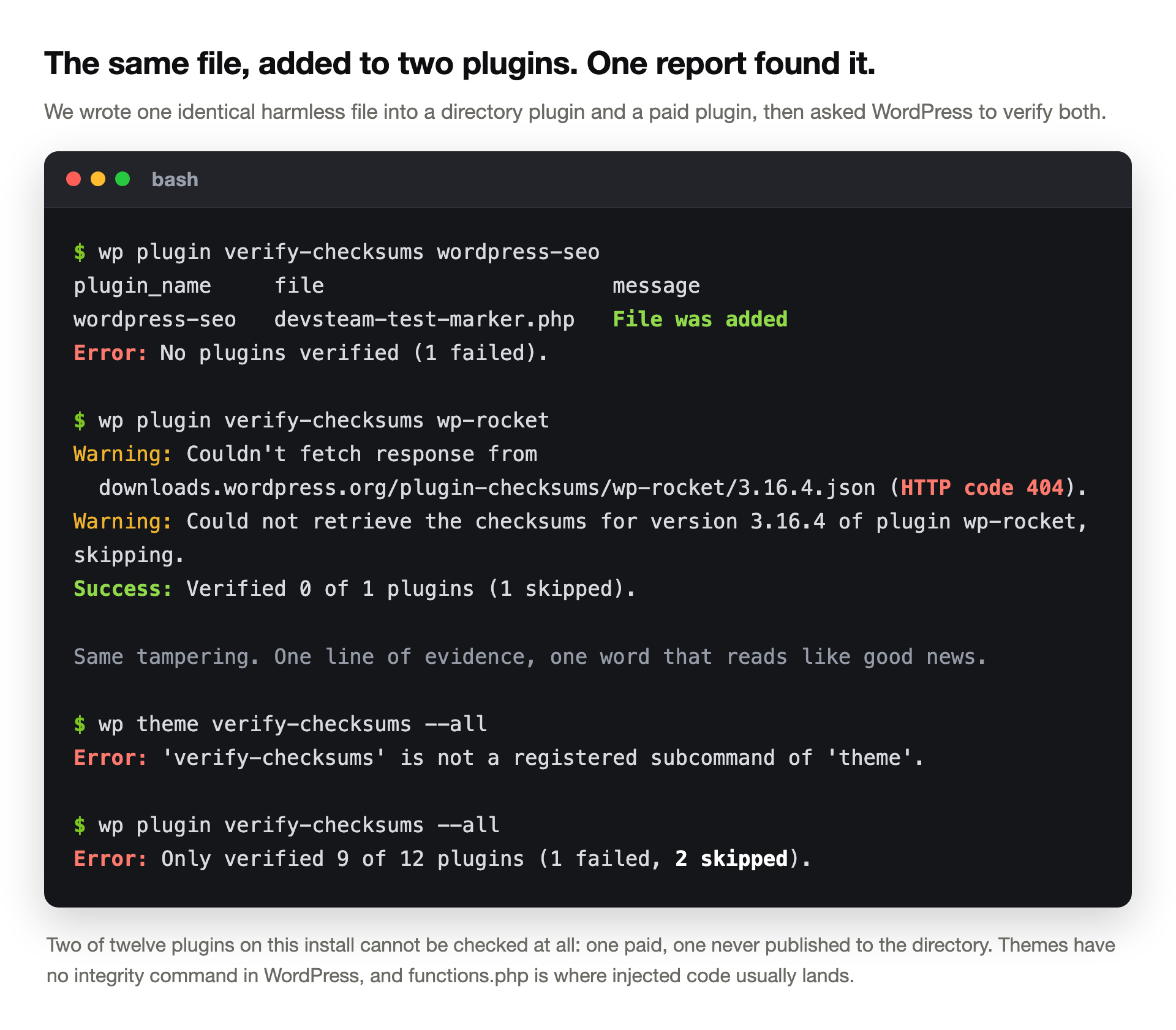
The directory plugin reported File was added and failed. The paid plugin asked wordpress.org for checksums, got a 404, and reported Success: Verified 0 of 1 plugins (1 skipped).
Same tampering. One line of evidence, one word that reads like good news.
On this install, two of twelve plugins give us nothing to check against. The second hole is bigger. Ask WordPress to verify a theme and you get this:
$ wp theme verify-checksums --all
Error: 'verify-checksums' is not a registered subcommand of 'theme'.
There is no such command. Attackers drop code into a theme’s functions.php more often than almost anywhere else. WordPress ships no way to check it.
Of fifteen reinfection guides we scored, one mentions this limit. Credit to Ishan Karunaratne at TechEarl. He writes that you compare paid and custom code against your own clean copy instead.
The clean restore that hands the door back
Restore a backup from before the hack. It is the most repeated advice in the field. Ten of our fifteen guides add a caveat: the backup may carry the infection.
Three mention the other risk, which is larger.
We archived one plugin at version 23.4, then patched it to 28.6. The update took 4.3 seconds. Restoring the archive took 0.7 seconds and put 23.4 back.
According to the wordpress.org API, 56 releases sit between those two versions. A restore six times faster than the patch gave all of them back.
WordPress offered the update again immediately, which is the only reason anyone would notice. If the hole was in that plugin, the restore reopened it. Rolling software backwards has its own set of consequences, and this is the worst of them.
It kept reporting zero malware, but I still felt uneasy. […] Every single plugin was deactivated. And there was one plugin installed that I have never used before.
u/m-ego, r/Wordpress, February 2026
That update came five days after they restored a backup and moved fifteen sites to separate hosting accounts. The scanner was clean the whole way through.
Hunt the access, not the payload
Searching sixteen thousand files for something you cannot describe is a bad use of an evening. Searching five tables for accounts and credentials is quick, and it answers the question that matters.
These five ran on our install in under two milliseconds each.
-- 1. every administrator, oldest registration first
SELECT u.ID, u.user_login, u.user_registered FROM wp_users u
  JOIN wp_usermeta m ON m.user_id = u.ID AND m.meta_key = 'wp_capabilities'
  WHERE m.meta_value LIKE '%administrator%' ORDER BY u.user_registered;

-- 2. rows whose ID order disagrees with their registration date
SELECT a.ID, a.user_login, a.user_registered FROM wp_users a
  JOIN wp_users b ON b.ID < a.ID AND b.user_registered > a.user_registered
  GROUP BY a.ID;

-- 3. one password hash shared by several accounts
SELECT COUNT(*) n, GROUP_CONCAT(user_login) FROM wp_users
  GROUP BY user_pass HAVING n > 1;

-- 4. who holds an application password
SELECT user_id FROM wp_usermeta WHERE meta_key = '_application_passwords';

-- 5. administrators with no session row at all
SELECT u.ID, u.user_login FROM wp_users u
  LEFT JOIN wp_usermeta s ON s.user_id = u.ID AND s.meta_key = 'session_tokens'
  JOIN wp_usermeta m ON m.user_id = u.ID AND m.meta_key = 'wp_capabilities'
  WHERE m.meta_value LIKE '%administrator%' AND s.umeta_id IS NULL;
Query two needs explaining. WordPress assigns the row ID, the attacker chooses the date. When someone writes an account straight into the table with a backdated registration, the two sequences stop agreeing.
It found both of our backdated stand-ins in 0.5 ms. The query carries no username, no email and no keyword. Someone describing a live incident laid out exactly that pattern.
Administrator accounts are being created directly in the database, not via WordPress: no username/email set, identical password hashes across multiple accounts, fake registration dates (e.g. 2020), no recorded login activity.
u/Upstairs_Control_611, r/Wordpress, May 2026
Query three catches the identical hashes. Query five catches the missing login activity. None of them needs a malware signature.
The scheduled hook that nothing answers
There is a sixth check, and it is the one we would run first.
Walk the cron option, and for each hook ask whether any code is listening. A hook with no callback is either debris from a removed plugin or a slot somebody is keeping warm.
$ wp eval '
$h = [];
foreach ( get_option("cron", []) as $set ) {
  if ( is_array($set) ) { foreach ( $set as $hook => $v ) $h[$hook] = true; }
}
foreach ( array_keys($h) as $hook ) {
  if ( ! has_action($hook) ) echo $hook, " ", gmdate("Y-m-d H:i", wp_next_scheduled($hook)), "\n";
}'
Our install has 24 scheduled hooks. One is an orphan, a leftover from Yoast, and it takes under a millisecond to find.
After the file cleanup there were two. The extra one was ours.
An orphan is not proof of anything by itself. The point is the size of the list. Two lines you can read in ten seconds beats a full-disk grep every time.
What fifteen guides cover, and what they skip
We read every article ranking for this problem from November 2025 to September 2026. We scored only the ones we could fetch in full. Four more refused to load, so we left them out rather than guess.
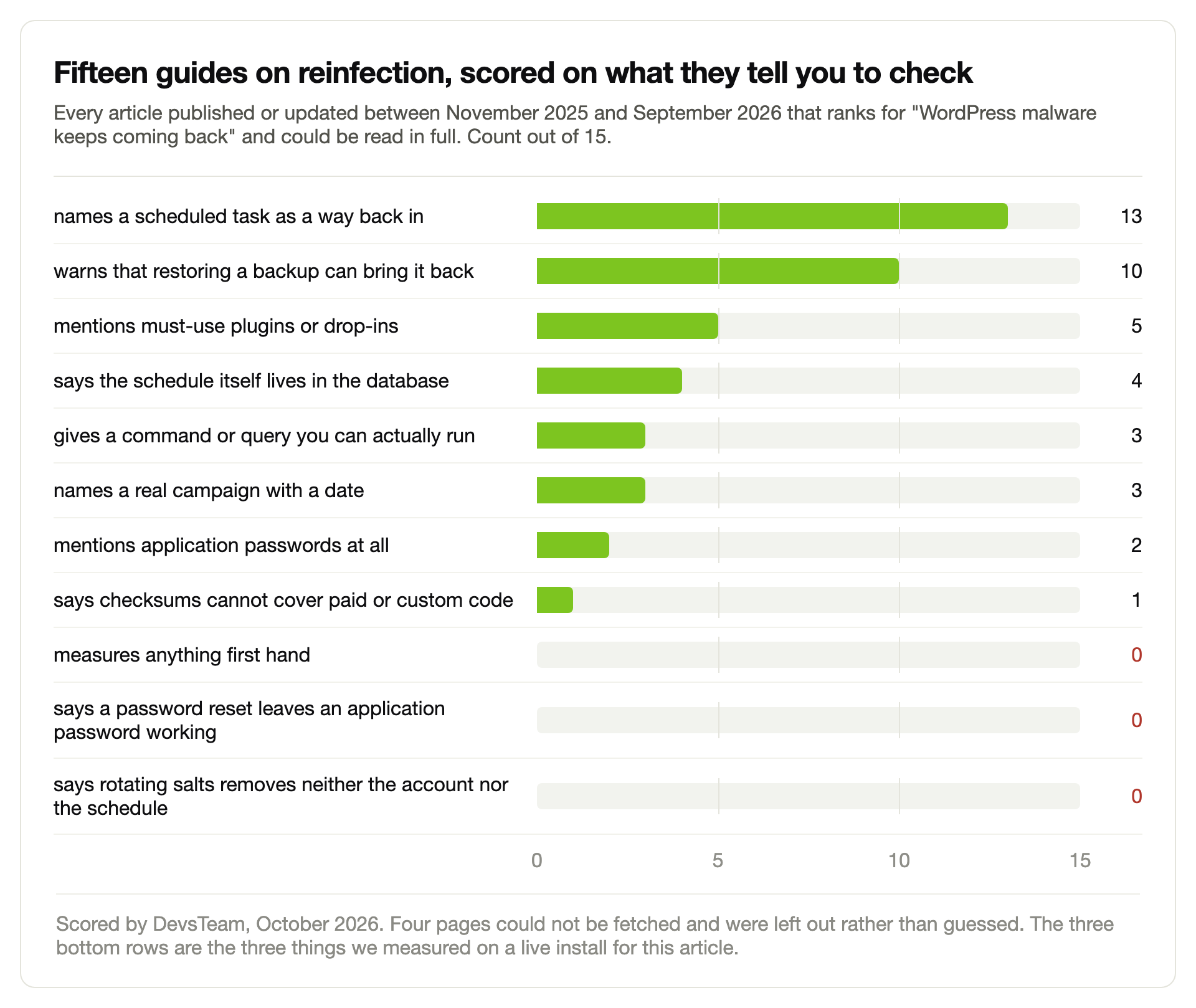
Thirteen of fifteen name a scheduled task. Only four say the schedule is a database row, which is the part that decides whether your cleanup worked.
Two mention application passwords at all, and both only in a list of things to rotate. None of the fifteen tells you a password reset leaves one working.
The field is not short of good writing. Nexura Security and TechEarl both publish real commands.
MalCare reported in December 2025 that it had found hidden admin-creating backdoors on around 600 sites in seven days. What is missing is anyone testing their own advice.
How common is this really
Sucuri’s figure is the one worth knowing. In January 2025 their team wrote that “49.21% of compromised websites were discovered to contain at least one backdoor at the time of infection”.
Roughly half. If someone hacked your site, a coin toss decides whether cleaning the visible damage was enough.
In November 2024 they documented a reinfector that injects itself into active plugins. It refreshes its payload through cron every 24 hours. It also adds an admin user with a random hexadecimal name, hidden from the user list.
Patching alone will not save you either. Patchstack counted 11,334 new WordPress vulnerabilities in 2025, up 42 percent. Of those, 46 percent had no fix available on the day they went public.
The order that actually holds
Sequence matters more than thoroughness here. Close the access first, then clean, then reopen.
1
Take the site offline, or at least off the internet
Maintenance mode is not enough if the attacker has a login. Block at the server or the firewall while you work.
2
List every administrator before you delete anything
Run queries one and two. Write down what you find, with dates. You will need this to work out when it started.
3
Revoke application passwords on every account
Not just the suspicious ones. This is the step no guide includes and the one our test proves nothing else covers.
4
Clear the orphan scheduled hooks
Run the cron check. Remove the ones nothing answers, and note the names before you do.
5
Now rotate: passwords, salts, database user, hosting panel, SFTP
Doing this before steps two to four just tells the attacker you are awake.
6
Replace core and directory plugins, compare the rest by hand
Paid plugins and your theme have no checksum to lean on. Diff them against a clean download yourself.
7
Patch everything, and only then restore anything
If you restore after patching, patch again. Check the version numbers rather than trusting the order you did things in.
8
Watch the user table for a week
In the case we opened with, the account came back two hours before the first file. The user table is your early warning.
Step eight is the one people skip. It is also the cheapest.
Four numbers, once a month, catch a repeat before your customers do. That is the whole argument for having someone check the boring things on a schedule.
When the loop will not break
Some of these do not end at the application layer. If files reappear seconds after deletion, the problem sits below WordPress. The same goes for a wp-config.php that rewrites itself while read-only.
Files reappear seconds after deletion […] .user.ini files with auto_prepend_file pointing to backdoors
u/Latter_Bodybuilder81, r/Wordpress, August 2026
That poster was running thirty sites in one hosting account. One compromised site reaches all of them, and no amount of cleaning inside WordPress will fix it.
Two signs say stop and escalate. Files you cannot delete as the account owner, which usually means an immutable flag only root can set. And reinfection that continues after a rebuild on fresh hosting.
Infections with a named signature, like the Japanese keyword variant, at least tell you what you are chasing. A nameless reinfection loop does not, and that is when an outside pair of eyes earns its fee.
Cleaned it twice and it is still coming back?
We find the way back in before we touch the payload. Accounts, credentials, scheduled rows, entry point. Then we harden the site so there is no third time.
See how our malware removal worksSite clean now? Then the work moves to closing the gaps an attacker would use next. Different job, much cheaper than this one.
Questions people ask after the second cleanup
How long after a cleanup does reinfection usually show up?
It depends on the schedule the attacker set, not on luck. Our test payload returned 586 ms after one copy of its loader came back.
In the documented case we quote, the account reappeared overnight and the files followed two hours later. Treat anything inside a fortnight as the same incident, not a new one.
I changed every password. How can they still get in?
Three ways, and we measured all of them. An application password on any account keeps authenticating to the REST API after a password reset.
A second administrator account has its own password, so yours is irrelevant to it. And a scheduled row in the database does not need to log in at all.
Does rotating the salts in wp-config.php fix this?
It logs everyone out, which is worth doing. It does not remove an account, a scheduled event or an application password.
We counted the session rows either side of a rotation: two before, two after. The rows stay, they simply stop matching the cookies people hold.
My security plugin says the site is clean. Can I trust it?
Trust it about files, within limits. Wordfence’s own support staff say an infection may sit in a database table their plugin does not scan.
Run the user and cron checks yourself. They take a minute and they cover the ground a file scanner cannot.
Should I restore a backup or clean the site by hand?
Restore if you have a backup from before the compromise and you know roughly when that was. It is faster and more complete than hand cleaning.
Then patch immediately. Our restore rolled one plugin back 56 releases in under a second. The hole would have come back with it.
How do I find the scheduled job that is putting the malware back?
Start with wp cron event list and read every hook name. Anything you cannot trace to an installed plugin deserves attention.
Then run the orphan check in this article, which lists only the hooks with no code behind them. Check your hosting panel’s own cron table as well, since that layer is separate.
Can one hacked site infect the others on my hosting account?
Yes, when they share a system user, which is normal on shared hosting. Several of the cases we read involved fifteen or thirty sites in one account.
Clean them together or not at all. A single site cleaned while its neighbours stay infected will be back where it started within the day.
How do I know the cleanup finally worked?
Pick evidence you can check again next week. The administrator list with registration dates.
The count of application passwords. The scheduled hooks, and your plugin versions.
Save those four today. If one of them changes and you did not change it, you have your answer in minutes.