Two fears keep people on a host they have outgrown. The site will go down, and the rankings will go with it.
Both fears are reasonable. Neither describes what usually goes wrong.
A move rarely fails with an error page. It fails quietly, in the hours after the switch, while every monitor you own reports a perfect day.
One developer on r/Wordpress named the problem in a single clause:
In rare cases when migrating a live site that may still be receiving writes during a migration, I’d add a die(‘migrating’); at the top of wp-config.php to avoid any split-brain.
kube1et, r/Wordpress, August 2026
Split-brain is the whole article. We read sixteen migration guides before writing this one. Two of them mention the risk. None of them measure it.
So we ran a migration on a throwaway store and counted what survived.
The short version
| Zero downtime is the easy half | Copy, test on the new server, switch DNS, keep the old one running. That part is well documented. |
| The hard half is the write window | While DNS spreads, both servers are live. Orders and enquiries land on whichever one the visitor reached. |
| We proved it costs you data | Two customers bought during the window. Both orders were numbered 25. Only one survived. |
| The famous command under-reports | “Success: Made 26 replacements.” Forty-seven of sixty-eight rows still pointed at the old host. |
| Lowering TTL to 300 changes little | On seven of nine real domains the A record was already that low. The NS record was usually six hours. |
| Rankings survive a host move | Keep the URLs, and search barely notices. A domain change is a different job with a longer tail. |
Zero downtime and no lost data are two different promises
Here is the sequence every guide describes, and it is correct as far as it goes.
Copy the site to the new server. Test it there on a temporary address. Point DNS at the new IP. Leave the old server switched on while the change spreads.
Nobody sees an error. Nobody sees a maintenance page. The promise is kept.
Now look at what that leaves running. For a few hours you have two live copies of one site. Each has its own database, and each accepts writes.
We wanted to know what that actually costs. So we built a WooCommerce store, cloned it, and let a customer buy from each copy.
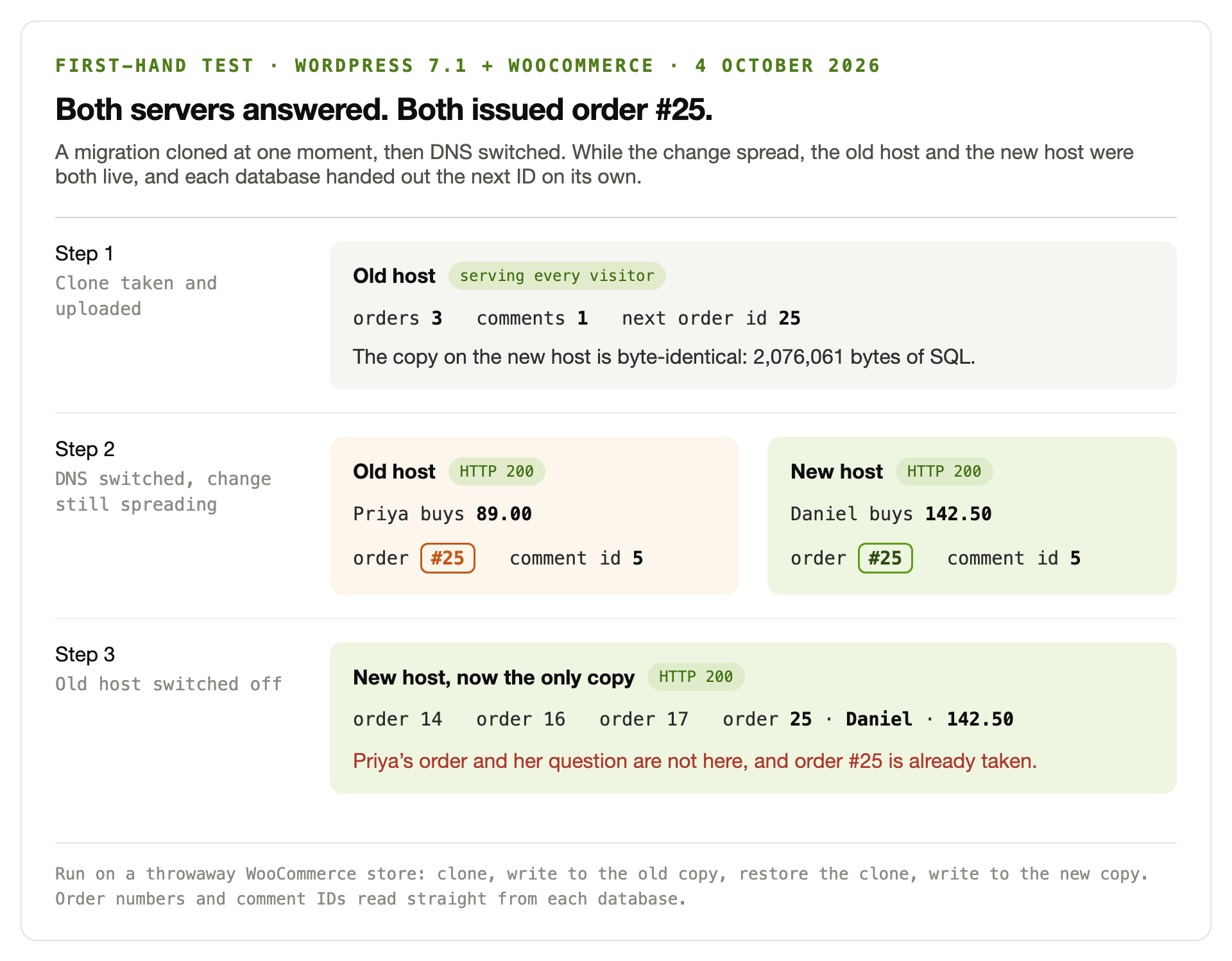
Priya reached the old server and spent 89.00. Daniel reached the new one and spent 142.50.
Both databases called it order 25. Both numbered the question each customer left as comment 5.
When the old server went dark, Priya’s order went with it. You cannot simply copy the row across either, because the ID it needs is already in use.
That is split-brain, and it applies to anything written by a visitor. Orders, comments, form entries, new registrations, abandoned carts, stock levels.
An agency owner running ten or more client sites put the same rule more simply:
Keep code in Git and treat the database as directional, not something to sync both ways. On WooCommerce or membership sites, never push the whole staging DB over production; orders and users kept changing while you tested.
NakanoNoNeko, r/Wordpress, August 2026
The fix is small and nobody sells it. Make the old site read-only for the length of the switch.
A brochure site can skip this. A shop cannot. Pick a quiet hour, stop writes on the old copy, take the final export, then switch.
Ten quiet minutes of a read-only checkout beats six hours of orders you will never see.
The TTL advice everybody repeats, measured
Eight of our sixteen guides give a TTL number. All eight give the same one. Lower the A record to 300 seconds, a day or two before you switch.
We checked whether that advice still does anything. Nine real domains, queried at five public resolvers on 4 October 2026.
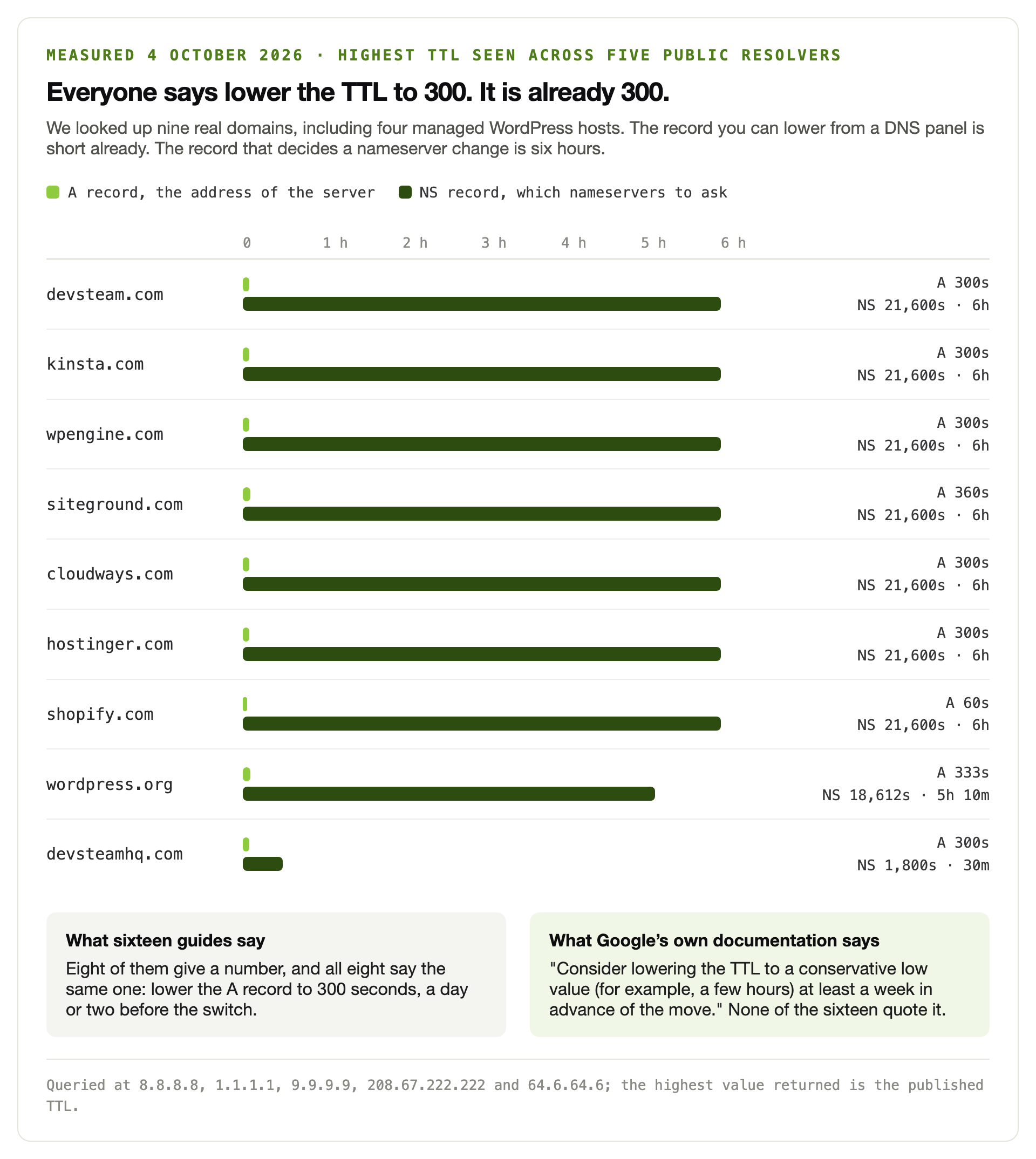
Seven of the nine already served the A record at 300 seconds or less. Shopify was at 60. The outliers reached 333 and 360.
The NS record told a different story. Seven of the nine published a six-hour TTL on it, and wordpress.org sat just over five hours. That is the record a resolver uses to find out which nameservers hold your zone.
This matters because of how most people move host. They do not edit an A record. They paste the new host’s nameservers into the registrar.
Lowering an A record has no effect on that. You are changing which server answers the question, not the answer.
Timing holds a second trap. A lower TTL only reaches a resolver once the old one expires. Publish the change before the clock you are shortening runs out.
Google says this plainly in its own documentation, and not one of the sixteen guides quotes it:
Consider lowering the TTL to a conservative low value (for example, a few hours) at least a week in advance of the move to refresh DNS caches faster.
Google Search Central, site move without URL changes
A week, not a day. Google also names the moment to switch the old server off: when the traffic reaching it falls to zero.
That is a measurement you can read in a log file, not a guess about propagation.
The command that said success and left 47 rows behind
Change the domain as well as the host and you have to rewrite URLs in the database. The usual instruction is one line of WP-CLI.
Our test store ran WordPress 7.1, with WooCommerce, Elementor, Yoast and Wordfence installed. An ordinary build. It had eighty database tables.
Before touching anything, we counted every row in every text column that held the old hostname. Sixty-eight rows, across ten tables.
Next came the canonical command, with its default options. Then we counted again.
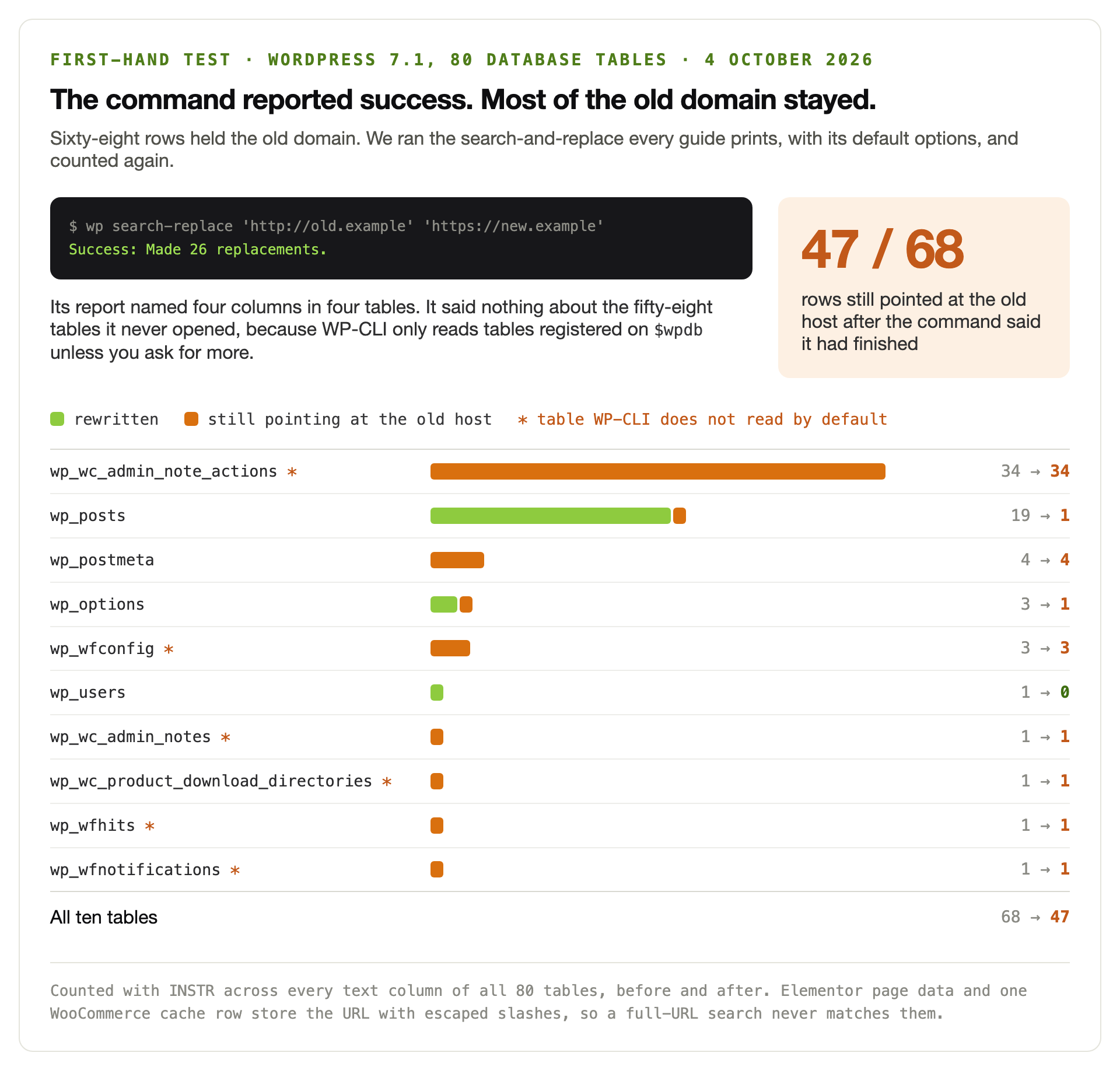
Forty-seven rows still pointed at a server we were about to switch off. The report had said Success.
It was not lying. It was answering a narrower question than the one we asked.
Three things went wrong at once, and all three are documented behaviour.
First, the table list. WP-CLI explains that by default the command uses tables registered to the $wpdb object. On our store that meant twenty-two tables out of eighty.
Forty-one of the surviving rows sat in the other fifty-eight. WooCommerce admin notes, a product download directory, Wordfence logs and its cached copy of your site URL.
Second, the search string. People search for the full URL, because that is what the plugin UI asks for.
Page builders store JSON, and JSON escapes forward slashes. We built one Elementor page. Elementor wrote its three URLs as http:\/\/old.example, so a search for http://old.example found none of them.
That page kept loading its image from the old host. Someone else hit the same wall on r/Wordpress last month:
This seemed to work. Better Search Replace found only two references to localhost, both in posts, so I replaced those.
JuniperCalle, r/Wordpress, September 2026
The site still tried to reach their laptop. A reply underneath it summed up why these hunts take so long.
“WordPress stores a lot more site-specific URLs in the database than you’d expect,” wrote Netalico on the same thread. Our count agrees.
Third, the GUID column. The default run happily rewrote nineteen of them.
WordPress is blunt about that one. Its documentation says: “Never, ever, change the contents of the GUID column, under any circumstances.”
A better command, and the rows it still misses
Three small changes fix most of this. Search the hostname rather than the full URL. Open every table. Leave the GUID alone.
# see what it would do, change nothing
wp search-replace 'old.example' 'new.example' \
  --all-tables --precise --skip-columns=guid --dry-run

# then run it for real
wp search-replace 'old.example' 'new.example' \
  --all-tables --precise --skip-columns=guid

Success: Made 52 replacements.   # instead of 26
Searching the bare hostname catches the escaped form, because only the slashes are escaped, never the domain. That alone recovered the Elementor page.
Twenty-two rows were left afterwards. Nineteen were the GUIDs we skipped on purpose.
The last three belonged to Wordfence. Its settings table stores values in a longblob column, and WP-CLI will not rewrite binary columns.
So the plugin kept its own cached copy of the old home URL and site URL. Resaving its settings clears that, and no command we tried did it for us.
Which is the real lesson. No single command reaches zero, so count the rows yourself before you believe the report.
Three bytes that silenced a contact form
There is a shortcut that looks faster than any of this. Export the database, run find and replace on the .sql file, import it.
We tried it, moving from a 15-character hostname to an 18-character one. The command made 311 replacements in under a second.
Loading the result, we asked Contact Form 7 for its settings.
# the stored mail template, before
a:8:{...s:6:"sender";s:41:"[_site_title] <wordpress@oldhost.example>";...}
500 bytes   unserialize() -> array of 8 keys

# after a plain find-and-replace on the dump
a:8:{...s:6:"sender";s:41:"[_site_title] <wordpress@newhost.example.io>";...}
503 bytes   unserialize() -> false

# what the plugin then reads
prop('mail') type: boolean
sender:    LOST
recipient: LOST
PHP writes the length of each string next to it. The text grew by three bytes and the number beside it did not.
From that point the whole array is unreadable. The form still appeared on the page. It still accepted a submission.
It no longer knew who to email. That is the same shape of failure as a site that keeps answering 200 after an update breaks it. You find it the same way, by using the thing rather than pinging it.
A raw find/replace in SQL to swap the domain can corrupt serialized data, widget and plugin settings because it doesn’t fix the string-length counts.
Borislav_Scala, r/Wordpress, August 2026
WordPress has warned about this for years, in its own migration documentation:
some themes and widgets store values with the length of your URL marked. When this changes, things break.
WordPress documentation, Migrating WordPress
Five of our sixteen guides repeat that warning. Good.
Plenty of people still take the shortcut, and when it breaks something, nothing tells them.
Some imports fail more loudly, which is a mercy. A half-loaded database usually gives you a blank page with no error on it. That at least tells you to stop.
What actually costs you rankings
Now the second fear. It deserves a calmer answer than it usually gets.
Moving to a new host is not a site move in search terms. Your URLs stay the same, so almost nothing changes from the outside.
Google expects a small wobble. Its documentation calls it “a temporary drop in Googlebot’s crawl rate immediately after the launch”. Crawling then climbs steadily over the following days.
Changing your domain is a different job. The advice online gets dramatic fast.
Avoid changing domains at all costs. If you change the domain, Google thinks it’s a new website and it will take 6-12 months to start ranking again, if ever.
ashm1987, r/SEO, November 2024
That is fear talking, and we understand where it comes from. Google’s guidance for a move with URL changes is less alarming and more specific.
Move everything at once rather than section by section. Expect a few weeks for a small or medium site. Keep the redirects “for as long as possible, generally at least 1 year.”
One year. Most people take them down when the traffic looks normal again, which is far too early.
The thing that genuinely kills a migration is simpler than any of this.
I’ve seen migrations get killed not by React itself but by people skipping 1:1 URL redirects, and rankings tank fast.
GrandAnimator8417, r/Wordpress, August 2026
Every old URL needs one hop to a live page. No chains, no guesses, no catch-all to the homepage.
Even then the tail is long. One site owner listed twenty-four separate things they had done after a rebrand, including the redirects, the sitemap and the change of address.
Since the migration 19 days ago, I’ve noticed a significant drop in organic performance… The old domain name still appears in search results for some queries.
AnyConsequence6047, r/SEO, November 2024
Nineteen days is not a verdict. Google’s own estimate is weeks for a small site and longer for a big one.
Want the pre-launch version of this? It is the same work as a crawl and indexing audit. Run it against the new copy, before anyone else can reach it.
The staging copy that emails your customers
Every guide tells you to test on staging. Few mention that a fresh clone is a fully armed copy of your business.
A fresh clone of production wakes up with a working mail config and a queue of pending jobs, and staging firing real customer emails is a mistake I’ve seen more than once.
Pulsar-Agency, r/Wordpress, August 2026
Live payment keys come across too. So do scheduled jobs, abandoned cart reminders and renewal notices.
Then there is the search engine setting, which bites in both directions. Six of our sixteen guides raise it, and it is the cheapest thing on this page to check.
A staging copy left open gets indexed, and you end up competing with yourself. A live copy that inherited the block disappears from search instead.
One command answers it. wp option get blog_public returns 1 on a site search engines may index. It returns 0 on one that asks them not to.
The order we move a site in
Nothing here is clever. The sequence is what makes it safe.
A week out, shorten the DNS clock
Lower the TTL on whatever record you plan to change. Do it early enough that caches holding the old value expire first. Switching nameservers instead? That TTL is often six hours, and not yours to set.
Copy, and point the new copy at itself
Files and database to the new server. Test it on a temporary hostname or by editing your own hosts file, so only you can see it.
Disarm the copy before you open it
Stop outgoing mail, swap payment keys for test keys, pause scheduled jobs. Check whether the copy is asking search engines to stay away, and whether it should be.
Fix the URLs properly, then count
Search the hostname, open every table, skip the GUID column. Then count the remaining rows yourself rather than reading the summary line.
Close the write window
Pick a quiet hour. Put the old site into maintenance mode, or just stop its checkout. Take the final export from a site nobody can change, import it, and only then switch DNS.
Leave the old server running
Watch its access log instead of guessing at propagation. Switch it off when the traffic reaches zero, which Google recommends and which you can actually see.
Re-verify in Search Console
Ownership verification often rides on a DNS record or a file you just replaced. Resubmit the sitemap, and if the domain changed, file the change of address.
What sixteen migration guides leave out
We read sixteen of the articles that rank for this topic. Host blogs, SEO agencies, plugin vendors.
They are better than their reputation. Backups, staging, redirects and sitemaps are covered carefully almost everywhere.
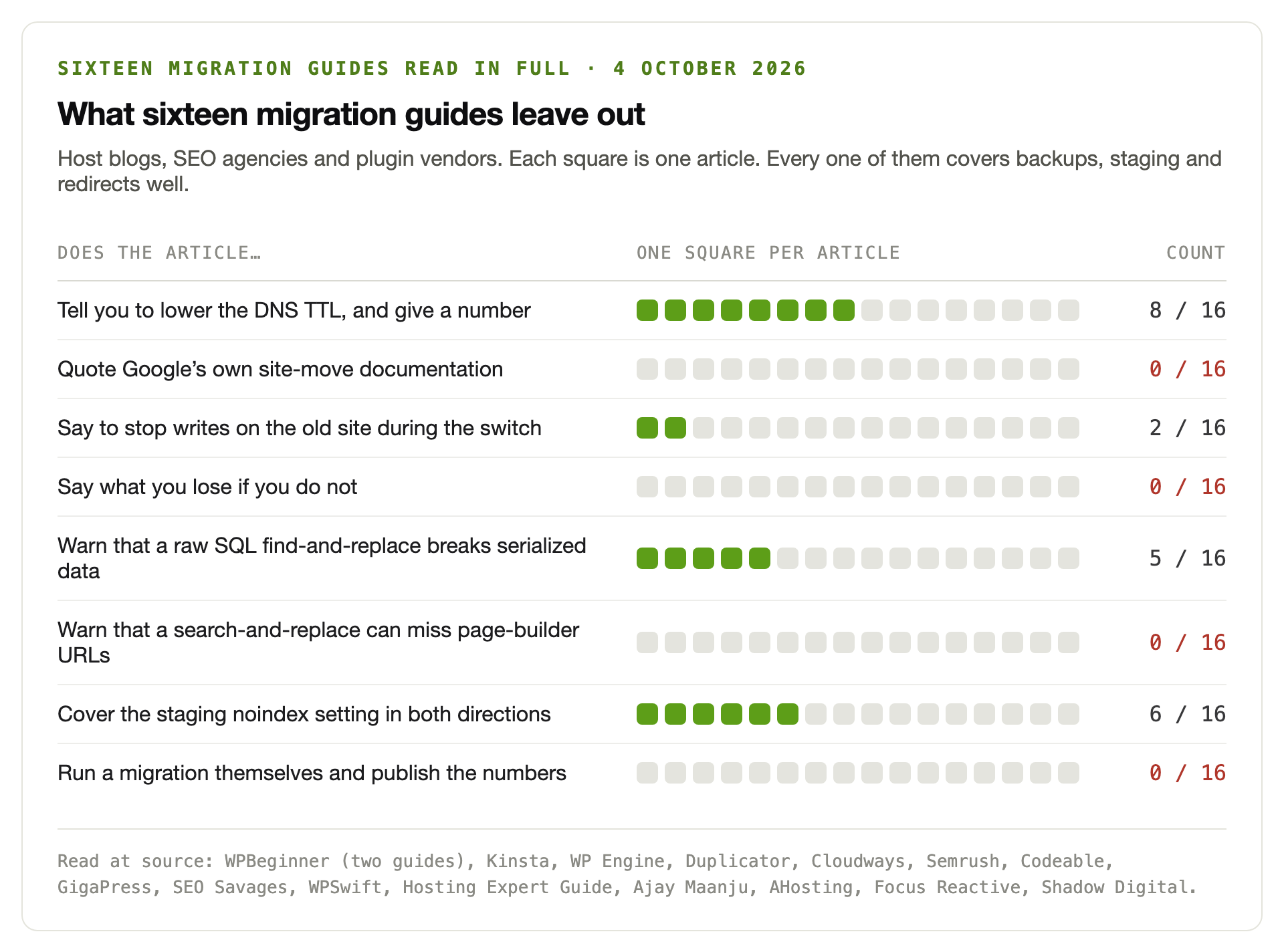
Two of the sixteen say to stop writes on the old site. GigaPress calls for maintenance mode, and WPSwift tells shops to pause order creation.
Both are right, and both leave the reader to guess why it matters. None of the sixteen puts a number on what the window costs.
Fifteen minutes of checks after the switch
Run these in order. Each one has an answer you can read, not a judgement you have to make.
Run the same list again a day later. It doubles as a short health check on the new server.
| Check | How | What a pass looks like |
|---|---|---|
| Old domain gone | Count rows holding the old hostname across every table | Zero, apart from GUIDs you skipped deliberately |
| Serialized data intact | Open a plugin’s settings screen and a widget area | Your settings, not the defaults |
| Indexing allowed | wp option get blog_public | 1 on live, 0 on staging |
| Mail works | Submit the contact form yourself and wait for it | The email arrives, from the right address |
| Checkout works | Place one real order and refund it | Order recorded, receipt sent, payment captured |
| Redirects are single hop | Crawl the old URL list and read the Location header | One 301 to a 200, trailing slash included |
| Both hosts agree | Request the homepage from each server directly | Same page, same content, same headers |
| Old server idle | Watch its access log | Traffic falls to zero, then switch it off |
Do not skip the checkout test. It is the one that catches payment keys left in test mode.
We move sites on a Tuesday morning, not a Friday night
Read-only window, counted URLs, verified redirects, and someone watching the logs until the old server goes quiet. Already mid-move and something looks wrong? Our emergency desk can pick it up today.
See how we handle migrationsTwo numbers we would not print
A figure for how long DNS propagation really takes would have helped. Articles quote 24 to 48 hours constantly.
It is folklore. Propagation takes as long as the longest cached TTL involved. You can read that rather than estimate it, so we described the method instead.
We also went looking for a typical traffic drop after a migration. Several checklists give one, usually around ten to fifteen percent.
Every trail ended at another blog with no dataset behind it. A number that averages a clean host move with a botched rebrand tells you nothing about yours.
Questions people ask us
Can you really migrate a WordPress site with zero downtime?
Yes, and it is not hard. Copy the site, test it on the new server, then switch DNS. Leave the old server running until its traffic stops.
Nobody sees an error page. Just remember that zero downtime is not the same as zero data loss. That is a separate problem with a separate fix.
What happens to orders placed while DNS is still switching?
They land on whichever server the customer reached, and the two databases never speak. We tested this on a WooCommerce store and both copies issued order number 25 to different customers.
Only one order survived the move. Stop writes on the old site for the few minutes it takes to switch, and the problem disappears.
Will moving to a new host hurt my Google rankings?
Not if your URLs stay the same. Google describes a brief dip in crawl rate after a hosting change. A steady rise follows over the next few days.
A domain change is a bigger job. Map every old URL to one new one. Keep those redirects for at least a year, and file a change of address in Search Console.
How low should I set DNS TTL before a migration?
Check it first. We measured nine real domains. Seven already served the A record at 300 seconds or less, so lowering it changes nothing.
Google suggests a few hours, at least a week ahead. Switching nameservers instead of an A record? The TTL that matters was six hours on seven of the nine.
Why do old URLs still appear after a search and replace?
Two reasons, and both are documented. WP-CLI only reads tables registered on $wpdb by default, which was twenty-two of our eighty tables.
Page builders also store URLs as JSON with escaped slashes, so searching for the full address misses them. Search the bare hostname, pass --all-tables, then count the rows yourself.
Can I just find and replace the domain in the SQL file?
Please do not. PHP stores the length of every string beside it. Change the text without changing that number and the whole value becomes unreadable.
We did it on a test site and Contact Form 7 lost its sender and recipient addresses. The form still appeared and still accepted submissions.
How long should I keep the old hosting account?
Until its access log goes quiet, which Google recommends as the signal to shut the old infrastructure down. That is something you can read rather than estimate.
Keep the final backup for longer than the account itself. A month of overlap costs very little next to rebuilding a site from memory.
What should I check in the first hour after a migration?
Use the site rather than ping it. Submit the contact form. Place one order and refund it. Open a page from your page builder, then log in as a customer.
Then run wp option get blog_public to confirm search engines are allowed. Spot-check that a handful of old URLs reach their new home in one hop.