
A customer pays. The money lands. Nothing arrives in their inbox, and nothing arrives in yours.
There is no error on screen. The order sits in the dashboard looking perfectly healthy. You only find out when somebody writes in asking whether the payment went through.
Then comes the part that makes no sense. Your contact form still emails you fine.
The site can send emails, so this does not appear to be a server or SMTP issue.
ajaysaklani25, WordPress support forums, December 2025
That reasoning feels solid, and it sends people down the wrong road for days.
Two completely different failures wear this same symptom. Either WooCommerce never wrote the message, or it wrote the message and the message never landed.
An SMTP service fixes one of them. It cannot touch the other. So the first job is telling them apart, and your store already keeps the receipt.
We set up a WooCommerce 11.1 store and broke it five different ways on purpose. Then we read every order and every log. Here is what each failure actually looks like.
The short version
| Open the order first | Since WooCommerce 10.9, every order’s notes record each email it tried to send, and why one failed. |
| A line saying sent | The message was built and handed over. Now it is a delivery problem, and SMTP is the right answer. |
| No email line at all | Nothing was ever built. No mail service on earth can deliver a message that does not exist. |
| One plugin can eat them | An exception thrown mid status change cost us both emails, the stock reduction and the sales count. The order still read Processing. |
| Some moves send nothing | Processing to On hold sent no email to anybody. A cancelled order tells you, and tells the customer nothing. |
| Your sender may not survive | Our SMTP plugin silently replaced the address set in WooCommerce while keeping the store name. We measured both. |
Open the order before you touch anything
Most advice starts at the mail server. Start one step earlier, at the order itself.
WooCommerce 10.9 shipped on 23 June 2026 with a change almost nobody has written about. Every transactional email now leaves a breadcrumb in the order it belongs to.
Go to WooCommerce, then Orders, then open the order. The notes panel sits on the right.
We ran two orders through the same store. One had a plugin throwing an exception during the status change. Nothing else differed.
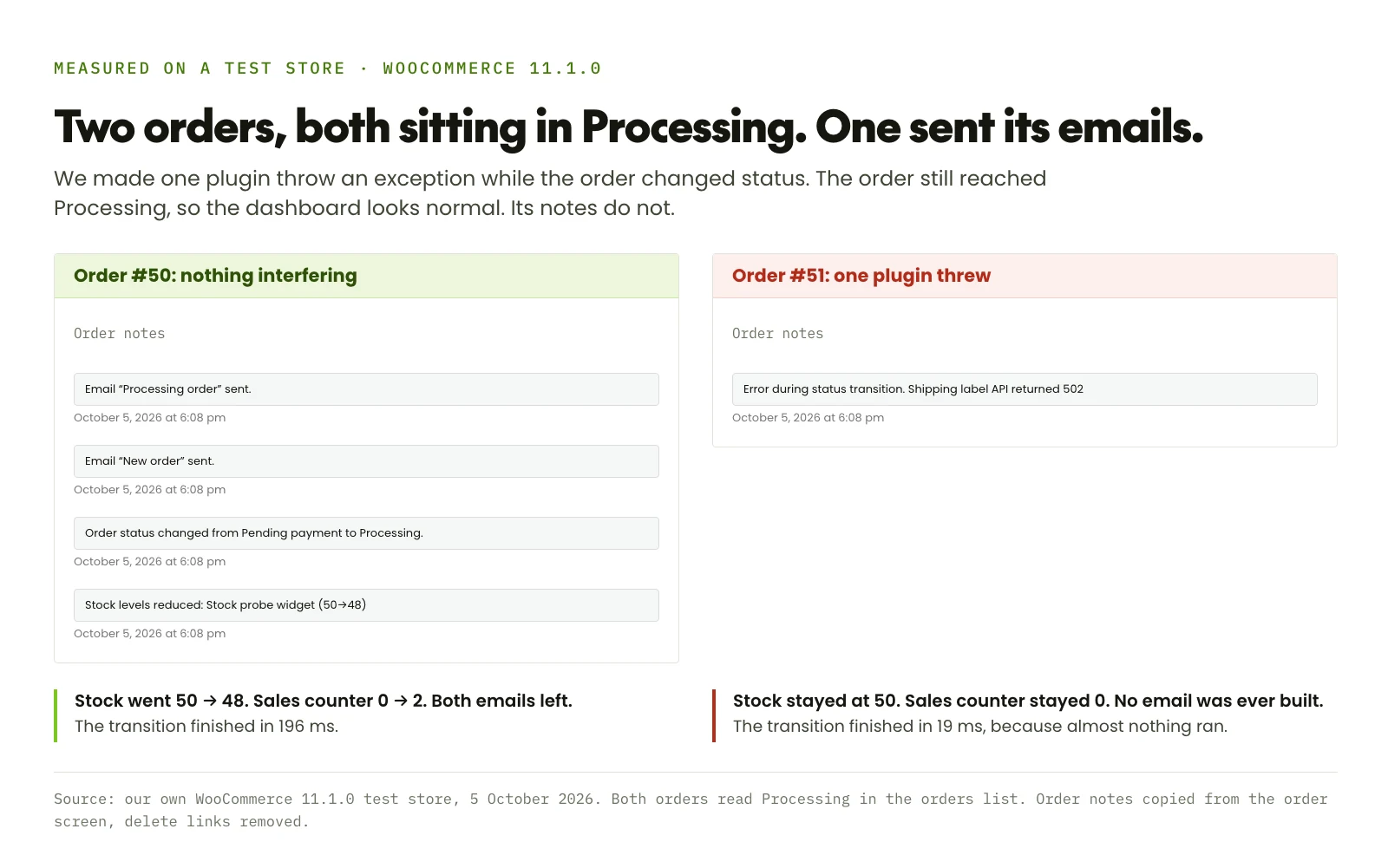
The healthy order says it plainly. Stock dropped, the status changed, and two emails went out.
The broken one carries a single line. No email note, because no email was ever built.
Those notes have six shapes, and each one points somewhere different. We produced every line below on our own store.
Built and handed to WordPress successfully
If the inbox is still empty, your problem lives past WooCommerce. Spam filtering, DNS records, or your host. Read the next section.
Your mail service refused, or nothing answered
The reason comes straight from the mail library, so it names the real problem. We produced this one by pointing the SMTP settings at a port with nothing behind it.
Another plugin threw, and the email never got built
The wording after the full stop comes from whichever plugin failed. That sentence names your culprit.
The email is off, or that move sends nothing
Disabled emails stay out of the notes on purpose. Check the log, then check whether the move you made has an email at all.
Something moved the order outside WooCommerce
A bulk tool or a direct database edit skips the whole chain. We reproduced this with one UPDATE statement.
Both at once, which is fine
A plugin failed after the emails had already gone. Worth fixing, but it is not why your inbox is empty.
The notes deliberately leave two cases out. WooCommerce explained the choice when the feature shipped:
So emails disabled in settings or emails skipped because there’s no recipient, do not show at the order level to keep the notes section lean.
Job Thomas, WooCommerce engineering blog, June 2026
WooCommerce still records those two, just somewhere else. Go to WooCommerce, then Status, then Logs, and open the source called transactional-emails.
We switched off the New order email and placed an order. The log caught it exactly:
// wp-content/uploads/wc-logs/transactional-emails-...log
NOTICE  Email "new_order" for order #55 not sent: email type is disabled
         {"email_type":"new_order","status":"disabled","recipient":"guest","order":55}
INFO    Email "customer_processing_order" for order #55 sent
{"email_type":"customer_processing_order","status":"sent","recipient":"guest","order":55}When the note says sent and the inbox stays empty
This is the classic case, and every guide aims at it. Here the advice is right.
WordPress hands mail to a function called wp_mail(). Without a mail service configured, that function passes the message to whatever the server has lying around.
Here is the cruel part. That handover can succeed while the message goes straight in the bin.
We pointed the server’s mail command at something that accepts everything and keeps nothing. Then we placed an order.
// Order notes after the transition
Order status changed from Pending payment to Processing.
Email "New order" sent.
Email "Processing order" sent.

// Messages that reached the mail server
0
WooCommerce was told the handover worked, so it wrote sent. Nothing arrived. This is exactly the silence people describe:
All other emails sent from the domain work, except for the New Order email. And similarly, the email does get logged as having been sent, but the recipient never gets it.
alexhoughtonmadcitycoders, WordPress support forums, March 2026
An authenticated mail service fixes this properly. Your store logs in to a real mail provider and gets a genuine answer back, success or failure.
Pick any of the usual providers and connect it with an SMTP plugin. Then set up SPF, DKIM and DMARC on your domain. That part of the standard advice is sound.
The sender address you set may not be the one that leaves
While testing, we hit something no guide warned us about.
We set the sender in WooCommerce, then Settings, then Emails. Name and address both. Then we placed an order and read the headers of what actually left.
// What we set in WooCommerce > Settings > Emails
Test Store <orders@test-store.example>

// What the mail server actually received
Test Store <dev-email@wpengine.local>
The name came from WooCommerce. The address came from the SMTP plugin, which had Force From Email switched on.
Half of each. You see your store name in the From line and reasonably assume the address is yours too.
That setting is not a bug, and plenty of good guides recommend turning it on. FunnelKit says so directly, and for a sensible reason. Your SPF and DKIM records rest on one consistent sender address.
The fix is not to switch it off. Set the same address in both places, so whichever one wins, you get the answer you expected.
One more thing that address has to satisfy. It must live on a domain you control.
A sender ending in gmail.com or yahoo.com fails checks at the receiving end. Your server has no authority to send as Gmail. Use your own domain instead.
When the email was never written at all
Now the half of this problem that the usual advice cannot reach.
WooCommerce builds order emails during the status change, not when the order is created. One function handles that moment, and it wraps the whole thing in a single try block.
// woocommerce/includes/class-wc-order.php, status_transition()
try {
	do_action( 'woocommerce_order_status_' . $to, ... );   // stock, payment capture, some emails
	// ... the status note is written here ...
	do_action( 'woocommerce_order_status_' . $from . '_to_' . $to, ... );   // the rest of the emails
	do_action( 'woocommerce_order_status_changed', ... );
} catch ( Exception $e ) {
	$logger->error( 'Status transition of order #%d errored!' );
	$this->add_order_note( 'Error during status transition.' . ' ' . $e->getMessage() );
}
Read what that does. If any plugin listening on those hooks throws, everything after it stops.
Not just the emails. The stock reduction, the sales counters and the payment capture all hang off the same chain.
The status itself saves before any of this runs. So the order lands in Processing and looks completely normal.
We wrote a small plugin that throws on demand. Then we ran the same order five times, moving the throw each run.
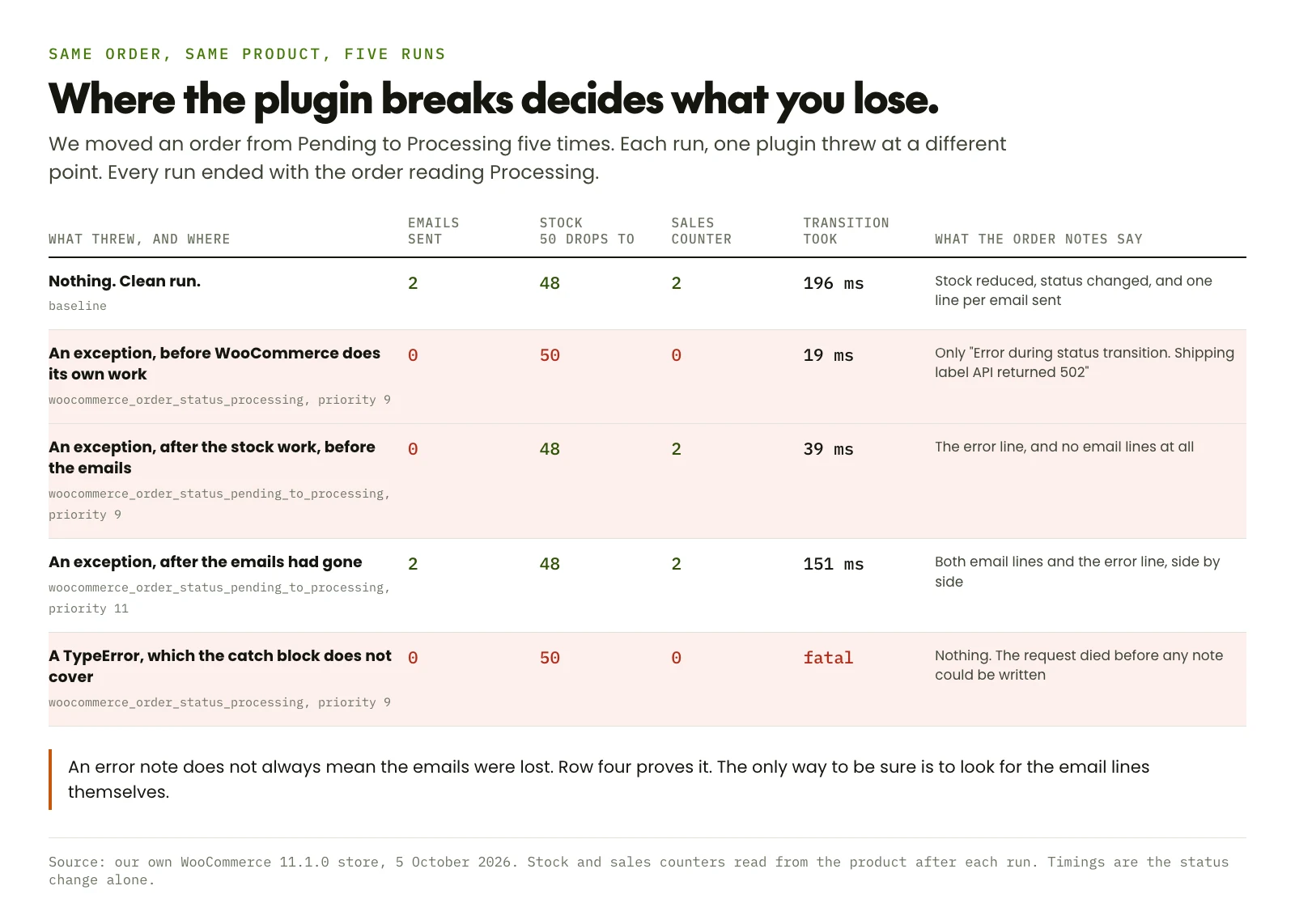
Look at row two. Zero emails, stock untouched, sales counter untouched.
That second part matters more than the email. Stock that never came down is stock you will sell again.
Row two also finished in 19 milliseconds against the clean run’s 196. Breaking early is fast, because almost nothing happens.
Row four is the honest counterweight. There the plugin failed after the emails had gone. The error note sits beside two perfectly good sent notes.
An error note on its own does not prove your emails were lost. Look for the email lines themselves.
Row five is different again. A TypeError is not an Exception, so that catch block never sees it.
The request dies instead. Your customer gets a broken page instead of a thank you. The order itself carries no notes at all.
A checkout throwing fatal errors costs you money by the minute. Treat it like the fire it actually is.
Somebody on the forums hit precisely this, fatal error and all:
I am using SMTP, the system is sending emails properly and when I get a new order and I access the order and resend the emails they work fine, but are not sending automatically when an order is placed!!!
adessowebs, WordPress support forums, February 2025
Manual resend works. Automatic does not. That gap is the signature of this failure, every time.
Resending runs the email on its own, nowhere near the status change. Nothing is there to throw.
This is not a fringe theory, either. A store owner filed exactly this against WooCommerce 11.1 in September 2026. The engineer who picked it up went straight to the same two places:
One possible cause is that another plugin fails while the order changes to Processing. In that case WooCommerce records the error but does not send the emails.
yuliyan, WooCommerce issue 68552, September 2026
If the notes name a plugin, deactivate that one and place a test order. The culprit is usually something that reaches outward during checkout.
Shipping label services, accounting sync, ERP bridges, stock feeds. Anything that calls another company’s server while your customer waits.
Worth checking when it started, too. Did the silence begin the same week as an update? Then look hard at that update before your mail setup.
Or the change you made sends no email by design
Here is the assumption that quietly breaks almost every guide on this subject.
Guides list which status sends which email. WooCommerce does not work that way. It sends on the move between two statuses, not on arriving at one.
That distinction sounds academic until you watch it. We put an order into each starting status, emptied the mail server, then made one single change.
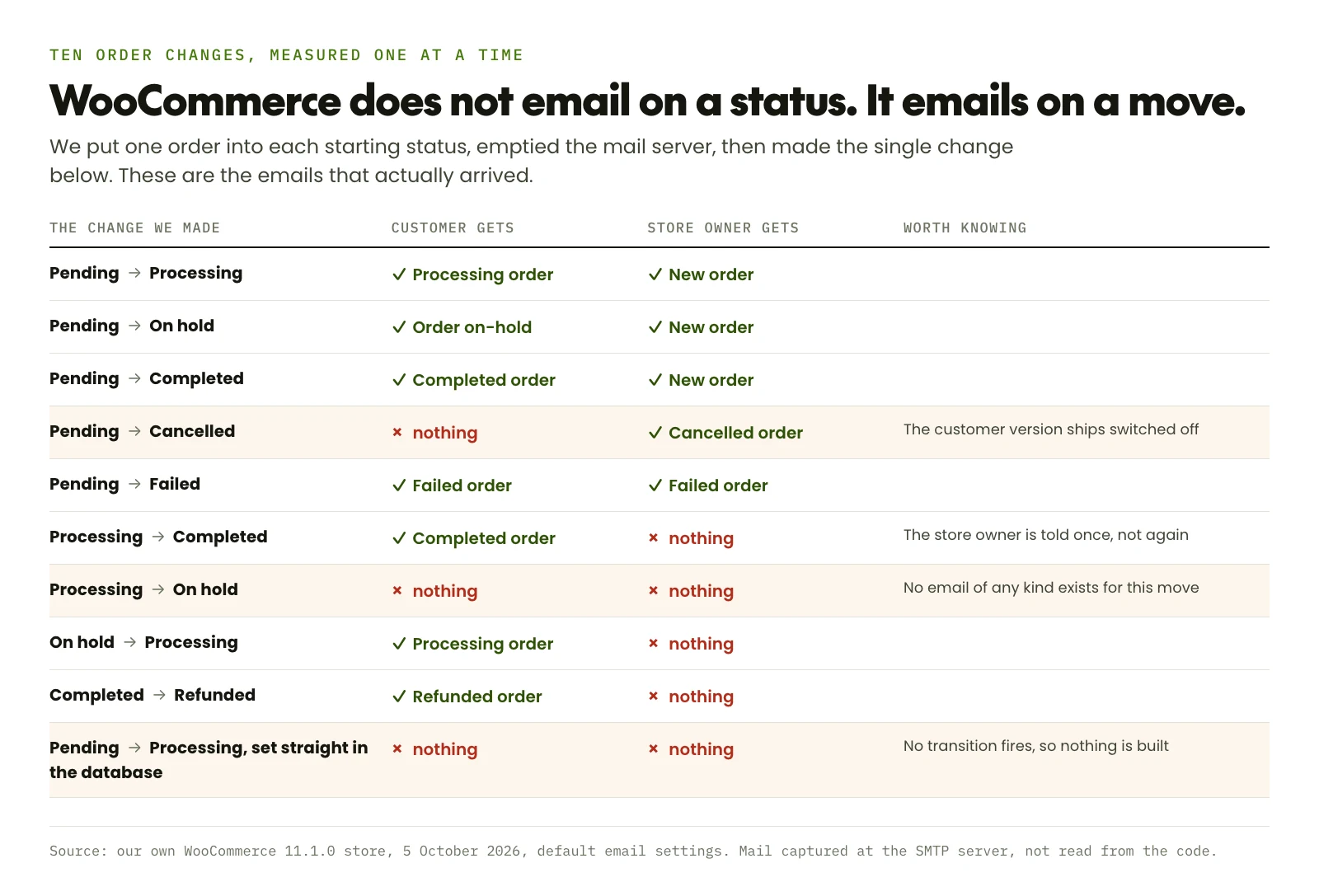
Three rows there surprise most store owners.
Processing to On hold sent nothing to anybody. Not to the customer, not to you. No such email exists in WooCommerce.
Say you park paid orders on hold while you check stock. Your customer hears silence at the moment they most want news.
Cancelling is nearly as lopsided. You get told. The customer does not, because the customer version of that email ships switched off.
Switch it on at WooCommerce, then Settings, then Emails, then Cancelled order. Ten seconds, and it closes a real gap.
The last row is the one that catches bigger stores. We changed a status with one database statement. Bulk tools and sync jobs sometimes do the same.
No email, no stock change, no notes. WooCommerce never knew the order moved.
Credit where it is due. Photon Console publishes a proper table of emails against statuses, which is more than most do. Its row for On hold still reads as though any arrival there notifies the customer. Our measurement says otherwise.
One guide does treat these as moves rather than states. Mail Mechanic lists the underlying hook names in full.
The speed setting that moves your emails somewhere else
One more place emails hide, and this one you may have switched on yourself.
WooCommerce has a feature called deferred transactional emails, under Settings, then Advanced, then Features. People recommend it to stores with a checkout that feels sluggish.
We turned it on and ran the same order again.
// Deferred transactional emails: off
transition took 196 ms   mail delivered: 2   notes: Email "New order" sent.

// Deferred transactional emails: on
transition took 28.5 ms  mail delivered: 0   notes: status change only
                       queued action pending: woocommerce_send_queued_transactional_email

// After the queue was allowed to run
                       mail delivered: 2   notes: Email "New order" sent.
The checkout got roughly seven times quicker. The emails did not vanish, they moved into the scheduled queue.
Which means your order emails now depend on that queue running. Break WordPress cron, or disable it without a real server cron job behind it, and nothing sends.
It also changes how you read the notes. No email line is normal for a few seconds here, and a permanent one means the queue has stalled.
The order to work in
Five minutes of looking in the right order beats an afternoon of swapping mail providers.
Open a real order that failed and read its notes
Not a test email from the settings screen. Those bypass everything this article is about, which is why they so often pass while real orders fail.
Look for a line naming the email
Sent means built and handed over. Failed to send gives you the mail server’s own reason. Neither one present means it was never built.
If nothing was built, look for an error line
Error during status transition names the plugin that threw. Deactivate it, place a test order, and watch the notes again.
If there is no error either, check the move you made
Processing to On hold has no email. Cancelled has none for the customer unless you enable it. Check the log for a disabled line too.
If it says sent, now go to the mail layer
Connect an authenticated mail service. Set the same sender address in both the plugin and in WooCommerce. Then get SPF, DKIM and DMARC right on your domain.
Place one more real order and check both ends
Customer inbox, your inbox, the order notes and the log. Fixing this without a real order through checkout is guesswork.
Orders arriving, confirmations not?
We trace one real order from checkout to inbox, find the layer that drops it, and fix that layer. Then we watch your store so the next silent failure reaches us before it reaches your customers.
Get your order emails workingWhat fifteen guides leave out
We read fifteen published guides on this problem before writing a word, WooCommerce’s own documentation included.
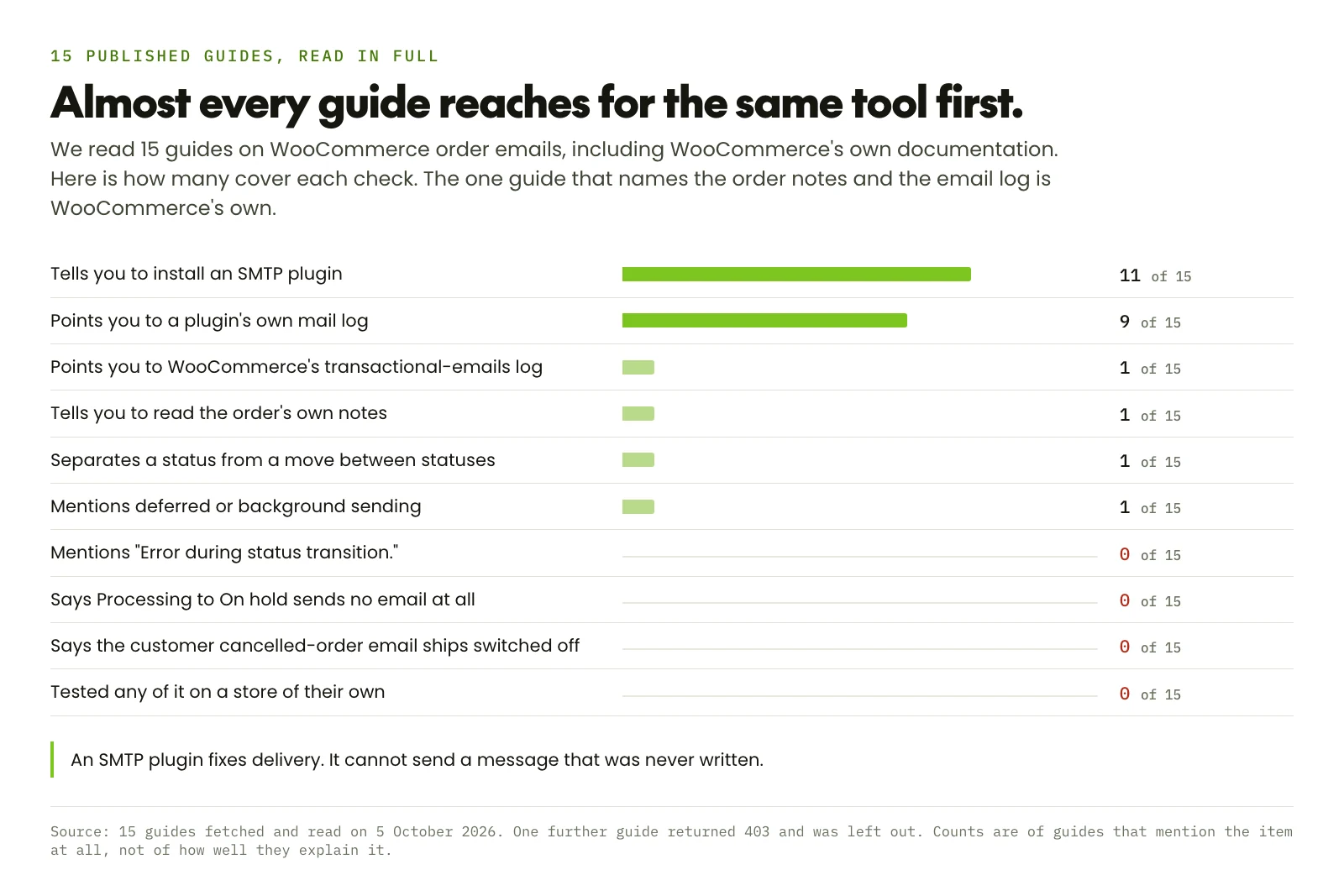
Eleven tell you to install an SMTP plugin. For the delivery half of this problem, that is the correct answer.
Nine send you to a mail plugin’s own log. That log only records what WooCommerce asked it to send.
So in the case we measured above, that log is empty and reads like a broken plugin. It is not. Nothing was ever requested.
One guide of the fifteen names the WooCommerce email log and the order notes. It is WooCommerce’s own documentation, it is thorough, and it is worth your time.
None of the fifteen mentions the error note. None says that moving a paid order to On hold emails nobody. None tested any of it on a store of their own.
Two things we would not claim
We could not test deliverability, and that is a real limit on this article.
Our store ran locally, so we could prove a message left and prove one did not. Whether Gmail files it under Promotions is something only a live domain with its own reputation can answer.
One forum thread we read offers a genuine clue there. A store owner switched the New order email from HTML to plain text. It arrived again, with SPF already correct.
if we switch the “new order” email from html to text, then the emails are delivered correctly again.
mmazziotti, WordPress support forums, March 2026
We have seen that work. We have not measured it, so we are passing it on as somebody else’s finding rather than ours.
The second gap is our research mix. Reddit’s search would not answer for us on the day we wrote this. So every quote here comes from the WordPress.org support forums.
That is where this particular argument actually happens, so we think the sample is fair. It is still one source, and worth saying out loud.
You will also see percentages quoted around this topic. Figures for how many stores SMTP alone rescues, usually somewhere above 80.
We could not find a dataset behind any of them, so you will not find one here.
Questions people ask us
Why is WooCommerce not sending order emails?
There are two separate causes, and they need different fixes. Either WooCommerce never built the message, or it built it and the message was not delivered.
Open a failed order and read its notes. A line like Email "New order" sent. means it was built, so the problem is delivery. No such line means it never existed, and an SMTP plugin cannot help.
My test email works but real orders send nothing. Why?
Because a test email skips the part that breaks. It calls the mail layer directly, with no order and no status change involved.
Real orders build their emails during a status change. A plugin that throws at that moment stops them. WooCommerce then writes an order note reading Error during status transition. followed by the reason.
Where do I find the WooCommerce email log?
Go to WooCommerce, then Status, then Logs, and pick the source named transactional-emails. It arrived in WooCommerce 10.9, released in June 2026.
Check the level threshold under the Settings tab there. Successful sends log at INFO. A store set to errors only hides every success and shows you nothing but failures.
Does an SMTP plugin fix WooCommerce order emails?
It fixes delivery, which is genuinely half of these cases. Your store then logs in to a real mail provider instead of handing messages to the server and hoping.
It cannot deliver a message that was never written. If the order notes carry no email line, installing one changes nothing at all.
Which order statuses actually trigger an email?
Statuses do not trigger emails. Moves between statuses do, which is why the usual lists mislead.
We measured ten moves. Pending to Processing emails both of you. Processing to Completed emails only the customer. Processing to On hold emails nobody at all.
Why does the customer get nothing when I cancel an order?
Because that email ships switched off. WooCommerce has a Cancelled order email for you. A separate one exists for the customer. Only yours runs by default.
Turn it on under WooCommerce, then Settings, then Emails. We confirmed the default on a clean WooCommerce 11.1 install.
I set the sender address in WooCommerce and it still sends from something else
Your SMTP plugin is probably overriding it. Most have a Force From Email option, and when it is on, that address wins.
We measured an odd half result: the store name came from WooCommerce while the address came from the plugin. Set the same address in both places and the question goes away.
Can missing order emails cost me more than a confused customer?
Yes, and that is the part worth worrying about. The emails are built in the same chain as your stock reduction and sales counters.
In our test, a plugin throwing early left stock sitting at 50 after a paid order for two units. Sell that stock again and the silent email is the smaller of your problems.
